
Webhooks
Webhooks notify your systems in real-time during the call lifecycle. Atoms sends an HTTP POST to your URL for each event you subscribe to.
Three events fire per call:
All three events share the same callId - use it as the join key when correlating events for the same call.
On an Enterprise organization with Zero Data Retention enabled, the post-conversation and analytics-completed events are your durable copy of the call. Once both are delivered, Smallest AI retains no content for the call, and never beyond the retention window.
Managing Webhooks
All webhooks are created and managed from the dashboard.
Location: Left Sidebar → Settings → Webhook
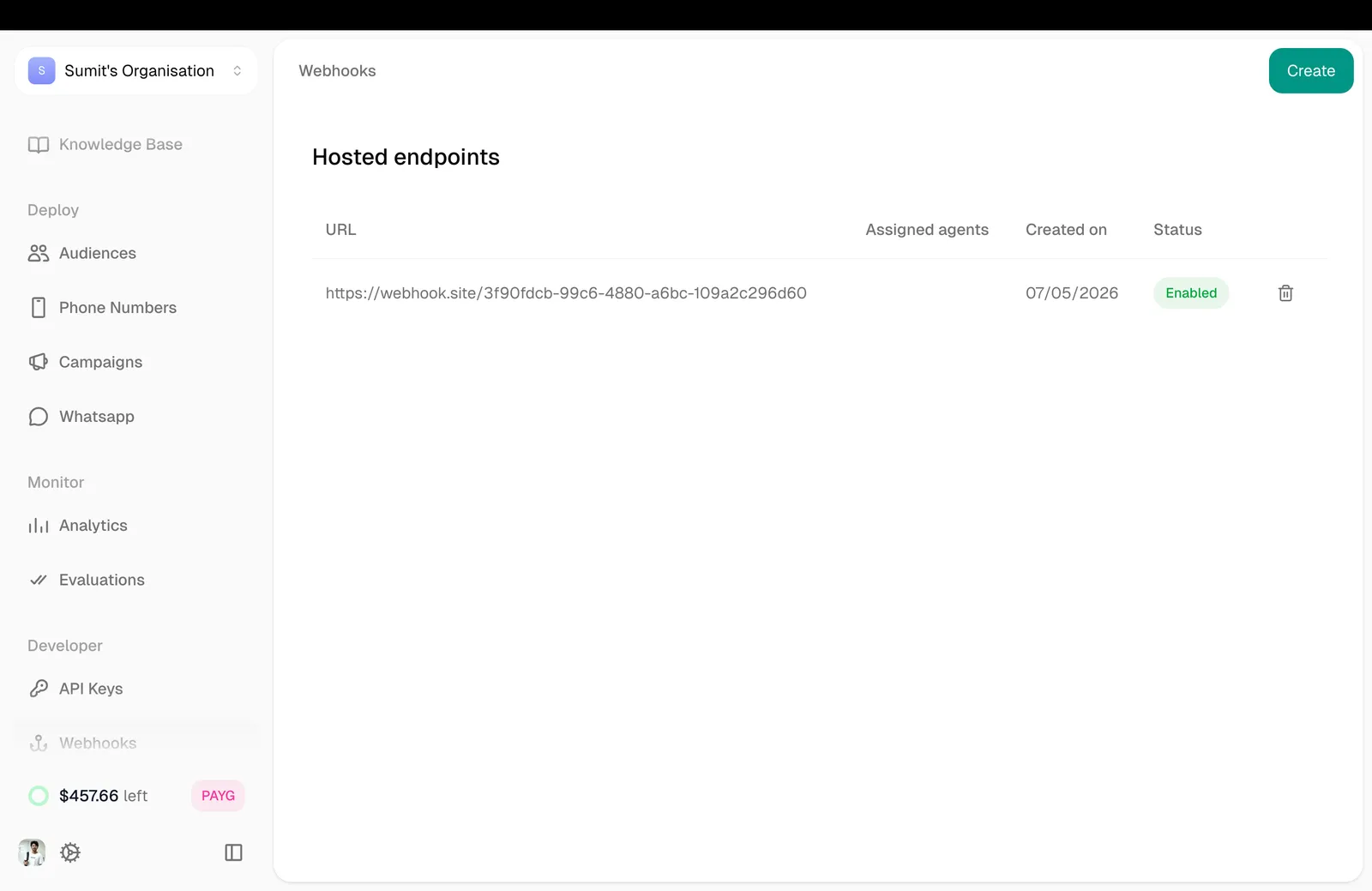
The table shows all your webhooks with their URL, assigned agents, created date, and status.
Creating a Webhook
Click Create to add a new webhook endpoint.
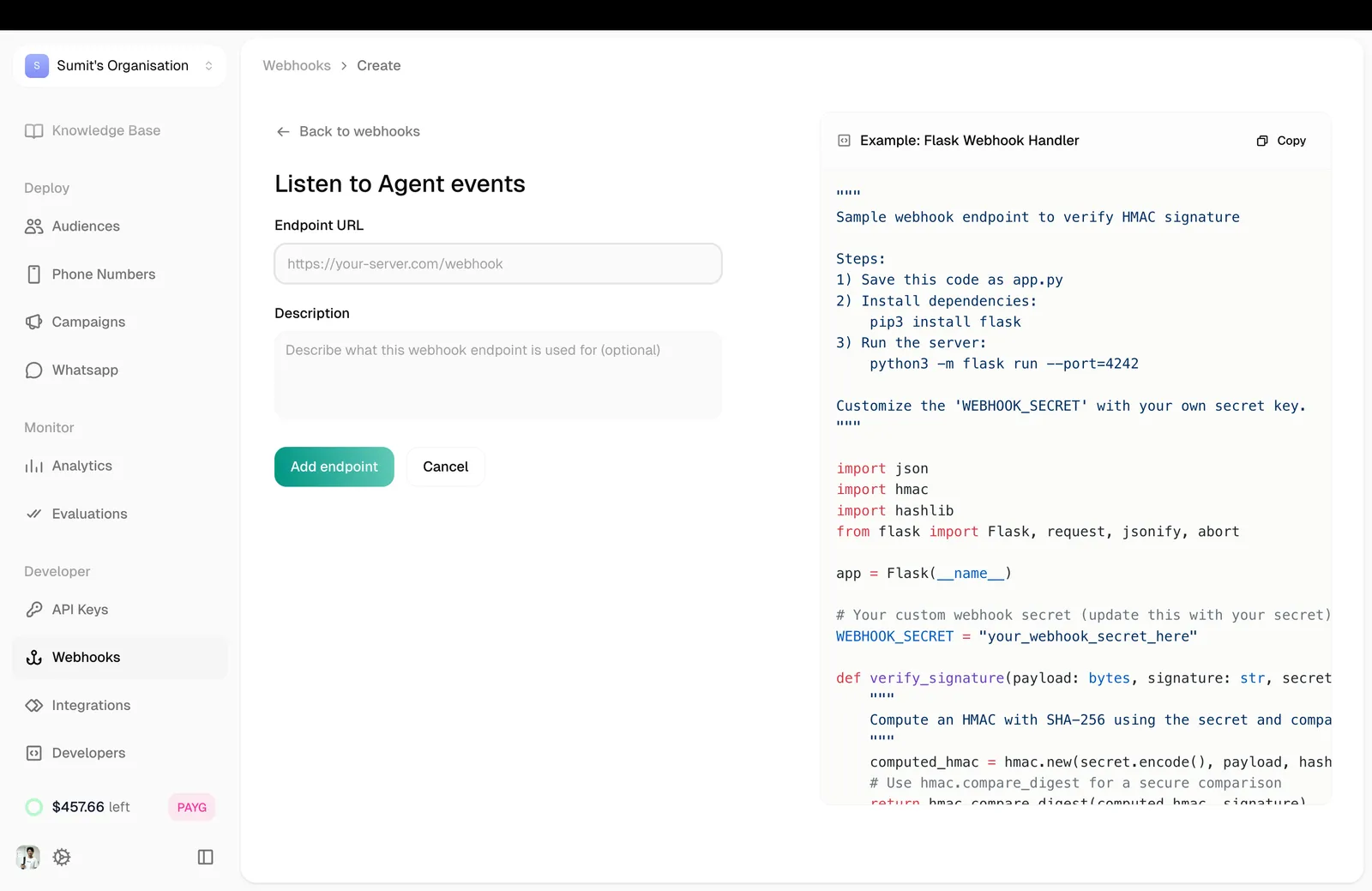
The right panel shows example Flask code for handling webhooks with HMAC signature verification.
Click Add endpoint to save.
Webhook Details
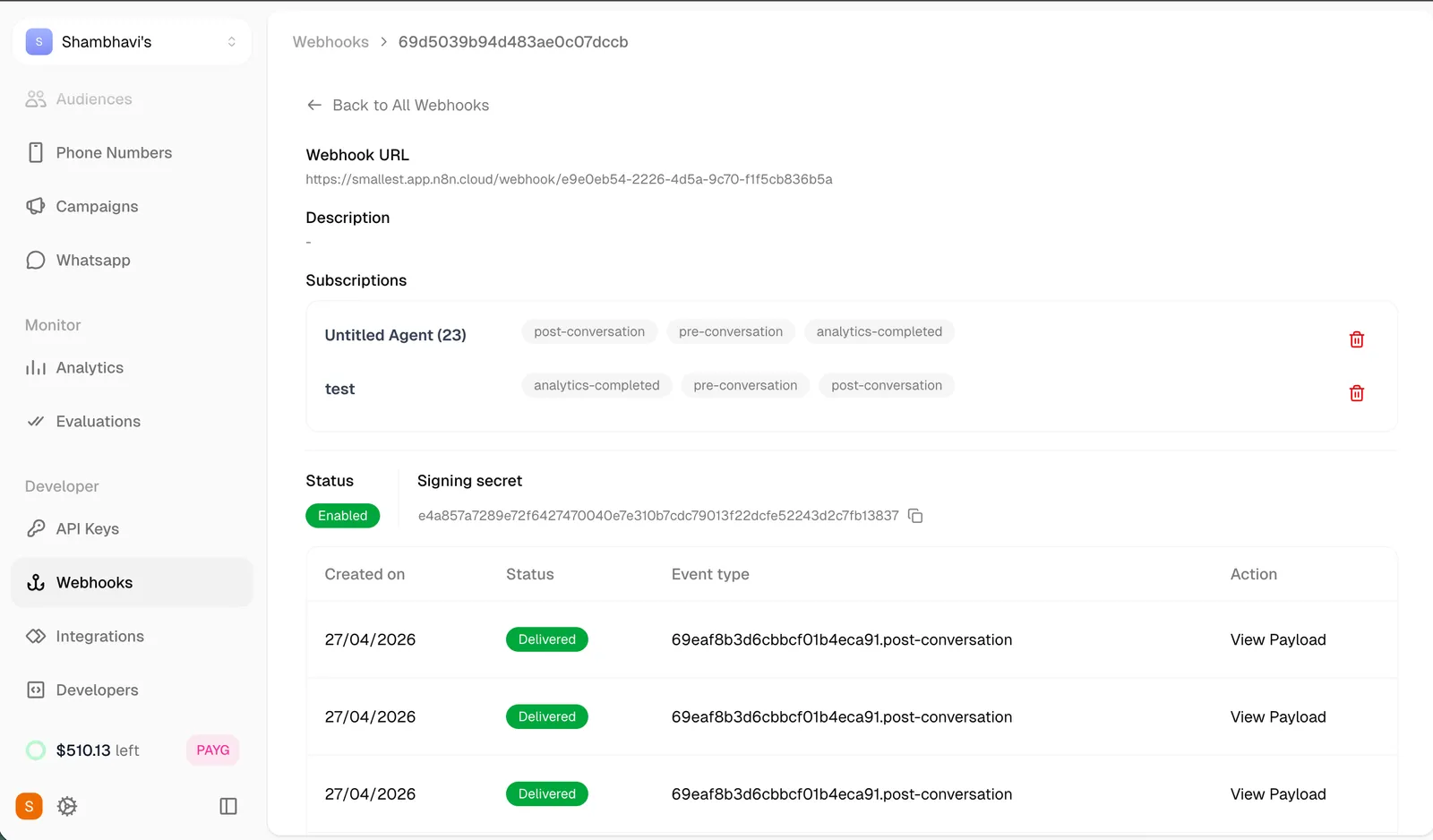
Click any webhook to see its details and subscriptions.
Adding to an Agent
Once a webhook exists, connect it to your agent.
Location: Agent Editor → Agent Settings → Webhook tab
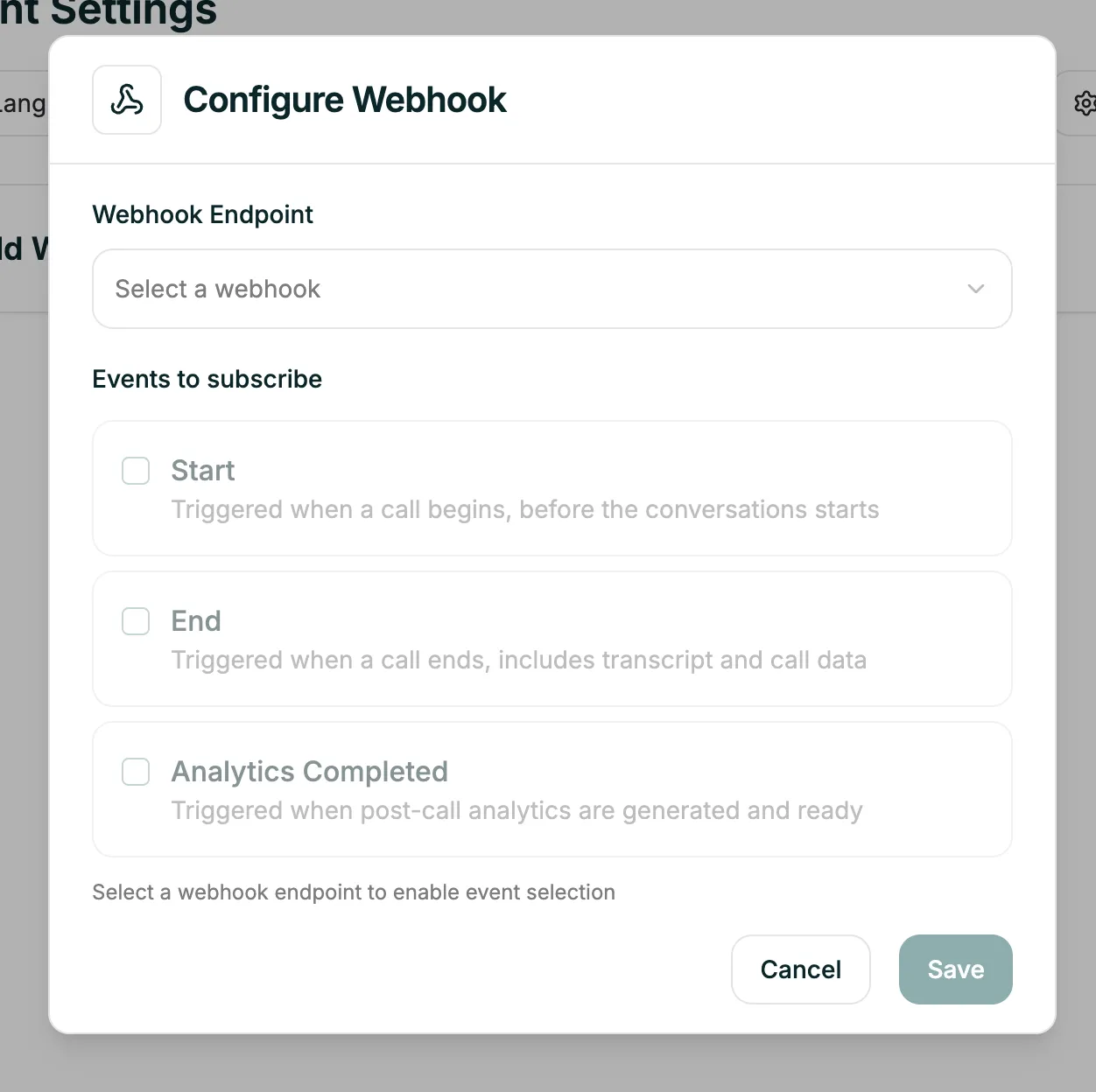
Select your webhook from the list, then check which events (pre-conversation, post-conversation, analytics-completed) you want to receive. The agent will now POST to that endpoint for each subscribed event.
Verifying signatures
Every request Atoms sends to your endpoint carries an X-Signature header. Verify it before trusting the body.
Algorithm
- HMAC-SHA256, hex-encoded.
- Key: the webhook’s signing secret (shown on the webhook detail page, or returned as
decryptedSecretKeyfromGET /webhookin the API Reference). - Message: the raw request body bytes, exactly as delivered. Do not re-serialize.
Python (Flask)
Node (Express)
Use a constant-time comparison (hmac.compare_digest in Python, crypto.timingSafeEqual in Node) to avoid timing side channels.
Managing webhooks via API
Everything you can do from the dashboard is also available under the Webhooks section of the API Reference. Notable behaviors:
GET /webhookandGET /webhook?webhookId=<id>both return the signing secret in thedecryptedSecretKeyfield, so you can fetch it programmatically without hitting the dashboard.POST /webhookreturns only the new webhook’s ID. CallGET /webhook?webhookId=<id>right after to retrieve the signing secret.PATCH /webhook/{id}can updateendpoint,description, andheadersonly. Event subscriptions cannot be changed withPATCH; add or remove them via thePOST /agent/{agentId}/webhook-subscriptionsandDELETE /agent/{agentId}/webhook-subscriptionsendpoints, or from the agent editor.
Deleting a webhook
DELETE /webhook/{id} fails with 400 if the webhook is still assigned to any agent:
Clean unassign path: call DELETE /agent/{agentId}/webhook-subscriptions for each agent that has the webhook attached, then retry the delete. Removing the webhook from the agent’s Webhook tab in the dashboard does the same thing.
Event envelope
Every webhook event shares the same top-level envelope:
Common metadata fields (present in all events)
1. pre-conversation
Fired before the agent begins speaking. Use this to enrich CRM data, log call attempts, or gate outbound calls.
metadata fields
Example body
pre-conversation does not contain callData, transcript, variables, analytics, or recordingUrl.
2. post-conversation
Fired after the call ends. Contains the full transcript, call metadata, recording URL, and all agent variables that were in scope during the conversation.
metadata fields
metadata.callData
metadata.transcript[] (array of objects)
Each element represents one speaking turn.
metadata.variables
A flat key-value object. The platform always injects a fixed set of standard keys. Any additional keys come from the agent’s own configuration (Agent Settings → Variables) or from prompt-declared placeholders.
Standard variables the platform always sets
Custom keys (e.g. agent_name, customer_name, due_amount) sit alongside these.
The variables object is otherwise fully dynamic. New custom keys can appear at any time depending on the agent’s prompt or the payload passed to the outbound call API. Your code should handle unknown keys gracefully. Store them in a generic JSON column rather than mapping each to a fixed column.
Example body
3. analytics-completed
Fired after Atoms finishes running the configured disposition and success metrics on the transcript. Arrives some time after post-conversation.
metadata fields
metadata.analytics
analytics.dispositionMetrics[] and analytics.successMetrics[]
Each metric is a self-describing object. The set of metrics is configured per-agent and can vary.
Example body
Event lifecycle and ordering
All three events share the same callId - use it as the join key.
Integration notes
variablesis dynamic - never hard-code column mappings. Store as JSON or iterate keys.dispositionMetrics/successMetricsare agent-configured - the set of identifiers and their types will differ across agents.pre-conversationusestoPhone/fromPhonewhilepost-conversationandanalytics-completedusetoNumber/fromNumber- normalize these in your ingestion layer.- Timestamps are always UTC ISO 8601 strings.
callDurationis a float representing seconds (not milliseconds).recordingUrlonly appears inpost-conversation.transcriptonly appears inpost-conversation.analytics(summary + metrics) only appears inanalytics-completed.
FAQ
What's the delivery timeout?
30 seconds per request. If your endpoint hasn’t returned a response in that window, Atoms marks the delivery as failed.
Does Atoms retry failed deliveries?
No. A non-2xx response or a network-level failure (timeout, DNS, TLS, connection refused) is logged as FAILED and the event moves on. Handle retries on your side: acknowledge fast with a 2xx, then process asynchronously; if your endpoint is down, drain from your own persistent queue once you recover.
What IPs does Atoms send from?
No fixed egress IP is published. Use the X-Signature header for authenticity; don’t rely on IP allow-lists.
Can one webhook fan out to multiple agents?
Yes. Assign the same webhook to several agents in the agent editor. The metadata.agentId field on every event tells you which agent produced it.
Is event ordering guaranteed?
Within a single call, the three events fire in this sequence: pre-conversation → post-conversation → analytics-completed. Deliveries themselves are best-effort; treat metadata.callId as the join key and reconcile on your side rather than assuming exact arrival order across concurrent calls.
How do I test webhooks locally?
Run a receiver on localhost and expose it with a tunnel (ngrok, cloudflared, etc.). Register the tunnel URL as the webhook endpoint from the dashboard, then place a test call. Live payloads land on your local process.
How do I fetch the signing secret programmatically?
Call GET /webhook?webhookId=<id> (or GET /webhook to get all). The response includes a decryptedSecretKey field with the plaintext HMAC key.
Can I change which events a webhook subscribes to?
Not through PATCH /webhook/{id} (it only updates endpoint, description, headers). Add or remove event subscriptions via the POST /agent/{agentId}/webhook-subscriptions and DELETE /agent/{agentId}/webhook-subscriptions endpoints, or from the agent editor.
Why do I get 400 when deleting a webhook?
The webhook is still assigned to at least one agent. Remove the assignment (either from the agent’s Webhook tab or via DELETE /agent/{agentId}/webhook-subscriptions), then retry DELETE /webhook/{id}.
Are variable keys stable?
The 11 platform-set standard keys (call_id, user_number, agent_number, conversation_type, agent_gender, default_language, supported_languages, current_date, current_time, current_day, timezone) are stable. Any additional keys come from the agent’s own config and can change whenever the prompt or outbound-call payload changes, so store variables as JSON on your side.