
Post call metrics
Post call metrics let you pull specific insights from conversations after they end.
Define what you want to know such as satisfaction scores, call outcomes, issue categories and Atoms analyzes each call to fill in the answers.
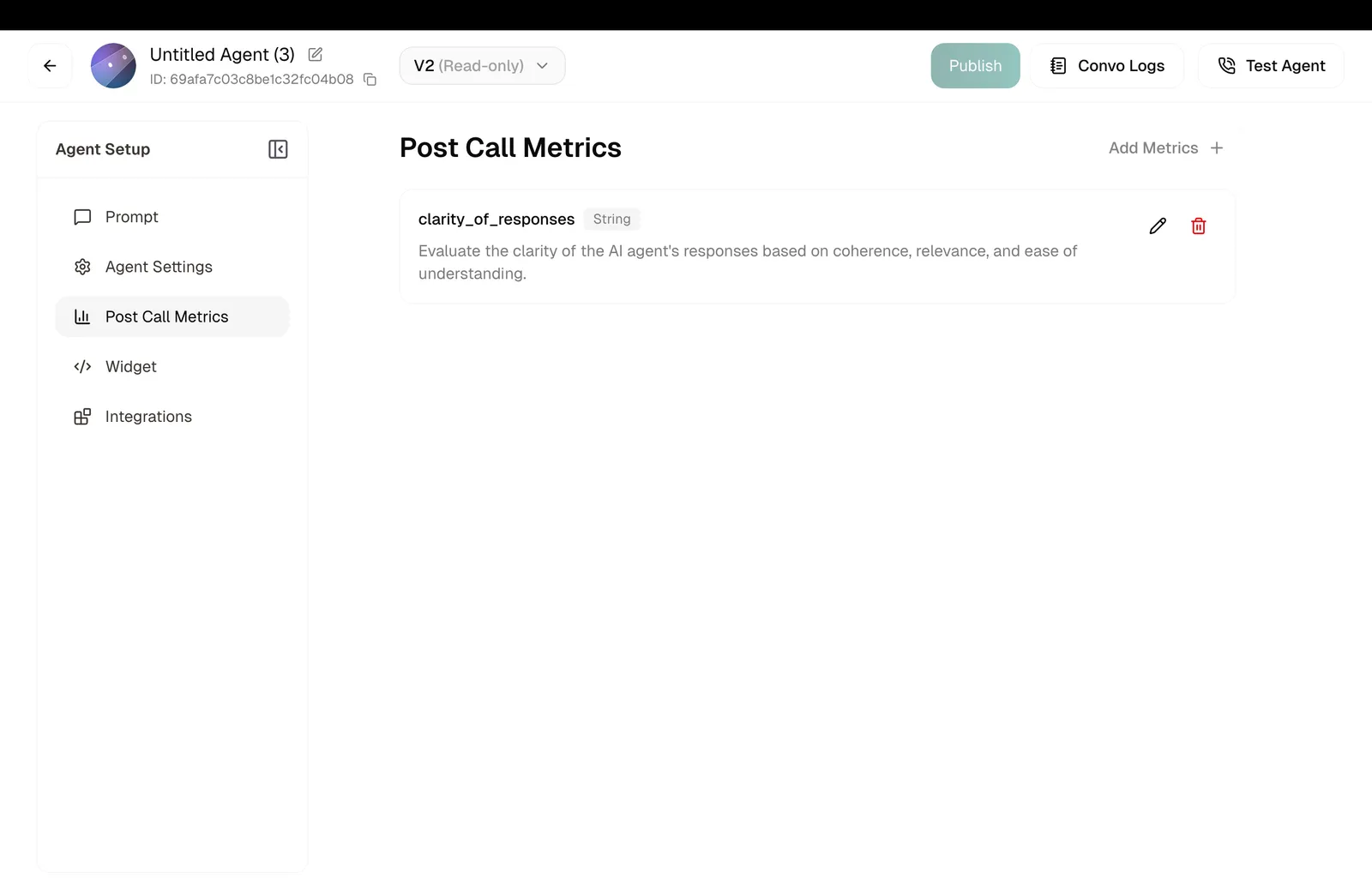
How It Works
- You define metrics: What questions do you want answered about each call?
- Call ends: Conversation completes normally
- AI analyzes: Atoms reviews the transcript against your metrics. This only happens when the user actually spoke. Unanswered calls, failed calls, and calls where only the agent spoke are not analyzed (see Calls with no analyzable transcript)
- Data populated: Your metrics get filled in automatically
- Access anywhere: View in logs, receive via webhook, export
On an Enterprise organization with Zero Data Retention enabled, metric values are not retained after the analytics-completed webhook is delivered. Receive them via webhook if you need to keep them.
After the call, the transcript is sent to the post-call-analytics (PCA) model, which outputs a value for every metric you configured. Each output is validated (type check, enum membership, and so on) before it is stored and displayed. A metric that fails validation is not analysed: it shows up with an empty value for that call. Mis-authored metrics also make post-call analytics take noticeably longer to complete for every call. Follow the authoring rules below to avoid this.
Calls with no analyzable transcript
Three call outcomes skip PCA and return a fixed fallback in postCallAnalytics. The call detail response still returns 200 and postCallAnalytics is populated, but every dispositionMetrics[].value is null (with confidence: 0) and the summary + per-metric reasoning carry a fixed diagnostic string. The exact strings customers see are:
Consumer guidance: treat a null value as not evaluated, not as evaluated-to-null. Filter these calls out of dashboards where “no data” and a legitimate null-typed answer would mean different things. If you need to programmatically catch all three, either check dispositionMetrics[0].value === null (they are always null together) or match summary against the exact strings above.
Creating a New Metric
Click the Add Metrics + button to open the configuration panel. You’ll see two options:
Disposition Metrics
Templates
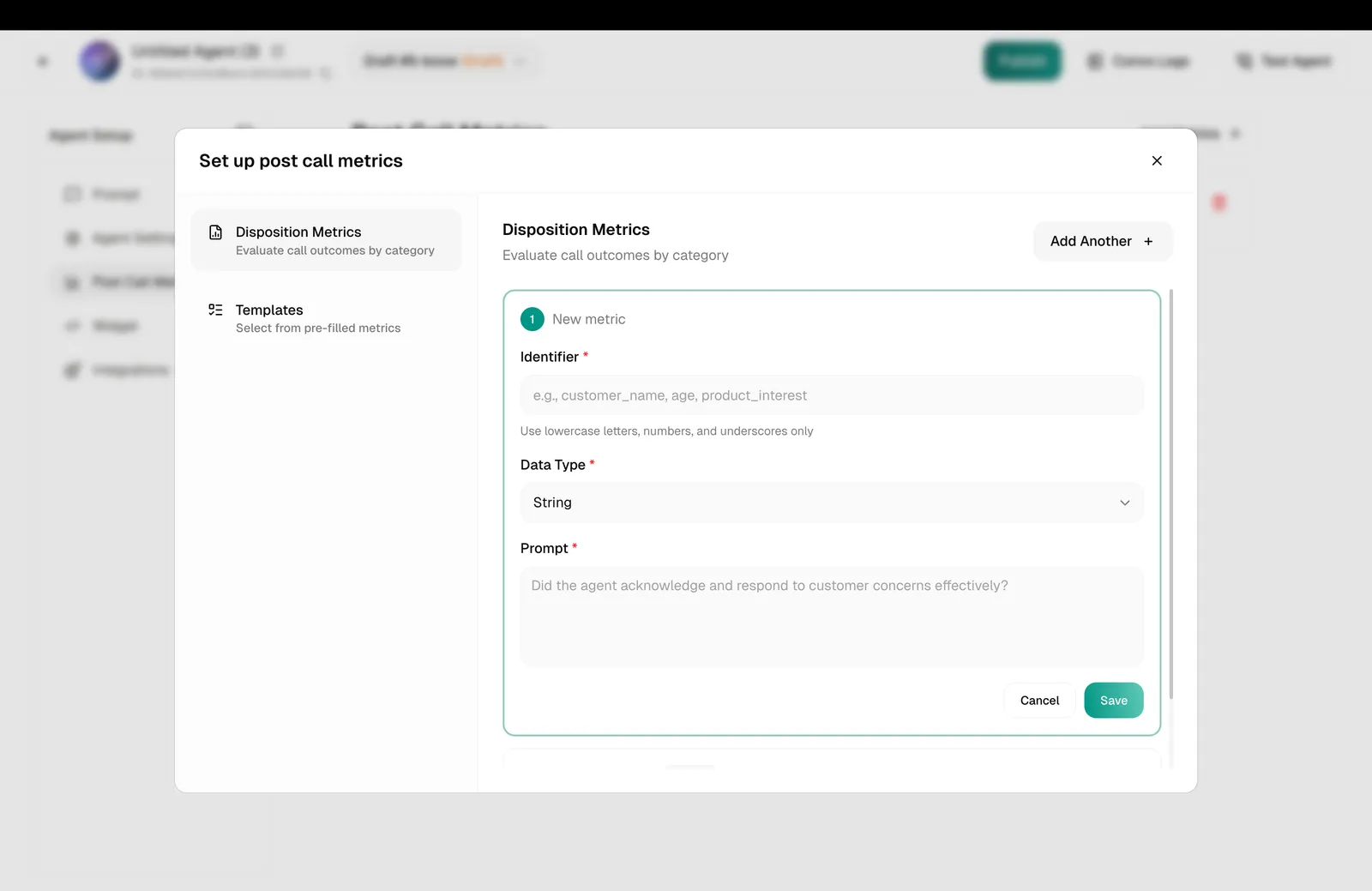
Build a custom metric from scratch. Fill in the Identifier, Data Type, and Prompt. See details below.
Use Add Another + to create multiple metrics at once.
Don’t forget to hit Save in the Disposition tab once you’re done.
Configuring a Metric
Each metric needs three things:
Identifier
This is the key used to reference the metric in exports, webhooks, and the API.
Naming rules: Lowercase letters, numbers, and underscores only. No spaces or special characters.
Data Type
Prompt
This is the question the AI answers by analyzing the transcript. Be specific.
Good prompts:
- “Did the agent acknowledge and respond to customer concerns effectively?”
- “Rate customer satisfaction from 1 to 5 based on tone and words used.”
- “What was the primary reason for this call? Options: billing, technical, account, other”
Vague prompts to avoid:
- “Was it good?”
- “Customer happy?”
Start with 3-5 metrics. Too many can slow analysis and clutter your data. Add more as you learn what insights matter most.
Authoring rules & common failure patterns
Get any of these wrong and the PCA model’s output for that metric fails validation. The metric is left empty for that call, and analytics for the call takes longer to complete. The five rules below cover most of the failure patterns we see in production.
Enum outputs must be fully enumerated
Anything you ask the model to output has to exist in the choices list. If the prompt can lead the model to emit a value (including null or "none") that isn’t in the enum, validation fails.
If you want “none” or “null” to be a valid outcome, add it as an explicit choice.
Never use skip / omit conditions on a metric
Conditions like “Omit this metric if callback_requested is No” cause the model to drop the field entirely, which fails validation and leaves the metric empty.
Keep the field always-present and use an explicit sentinel value instead. For example, “Return NA if callback is not requested” (with NA present in the enum).
Datatype must match the prompt
An integer-typed metric must never be instructed to output a string.
Common failure: an integer promised_amount field with a fallback like “output ‘Not Applicable’ if no amount was promised”. The string fails the integer type check.
Use a valid in-type sentinel instead (or a nullable/allowed value that matches the declared type).
Example Metrics
Call Outcome
Satisfaction Score
Follow-Up Needed
Issue Category
Configuring via API
Post-call metrics are set through the agent versioning flow: edit a draft’s config, publish it as a new version, and activate the version. There is no standalone post-call-analytics endpoint. Configuration lives on the agent’s active version.
Full flow
Disposition metric schema
Each entry in dispositionMetrics takes four fields:
Two analytics flags apply globally:
Reading current metrics
The active version’s metrics are surfaced under _resolvedConfig.postCallAnalyticsConfig. Each entry round-trips exactly as sent: identifier, dispositionMetricPrompt, dispositionMetricType, and choices (when the type is ENUM).
FAQ
Why are all the metrics empty on some calls?
Post-call analytics only runs when there is a user transcript to analyze. If the call was not answered, failed before connecting, or the user never spoke, the call is skipped. This is expected and not a configuration problem.
- In the dashboard, the Overview tab shows a fixed summary such as
Call was not answered.For unanswered and failed calls the Metrics tab shows No Analytics Available. For calls where only the agent spoke, each metric is listed with anullvalue and the reason. - In the API and webhooks,
summarycarries the fixed message and everydispositionMetrics[].valueisnull.
See Calls with no analyzable transcript for the exact strings and how to filter these calls out.
Why is my post-call analysis missing / not showing up?
Post-call analytics runs after the call ends, so it takes a moment to populate. If a call finished cleanly and a specific metric stays empty, it is almost always a validation failure on that metric. Check the authoring rules. A mis-authored field (wrong datatype, missing enum value, skip condition, etc.) is left empty for the call.
Why does my agent hallucinate values on some calls?
Almost always one of the authoring patterns above. The most common causes:
- An enum that doesn’t cover every value the model can produce.
- A metric prompt that asks the model to output a value in a type other than what’s declared (e.g. a string fallback on an integer field).
- A “weighted score” or “aggregate” metric with no weights defined, so the model invents them.
Review the metric definition against the authoring rules.
Can one metric reference another?
No. Each metric is extracted independently, not sequentially. If lead_disposition depends on the value the model returned for final_disposition, the reference is unreliable. Encode any cross-metric logic inside the individual metric’s prompt (using the transcript as the source of truth), not by referencing sibling metrics.