
Outbound Calls
Use start_outbound_call() to dial any phone number and connect it to your agent. This is the production outbound surface - full variables support for per-call personalization, optional caller-ID rotation, and version pinning.
Not to be confused with /agent/{id}/versions/{versionId}/test-call. That endpoint is a debug surface bound to a specific agent draft or version. It only accepts mode and toPhone, doesn’t carry per-call variables, and counts against test-call slot limits. For real outbound traffic - campaigns, lead callbacks, anything customer-facing - use the pattern on this page (which maps to POST /conversation/outbound).
Basic Call
Pass from_number (E.164, exact match to a number your org owns) unless the agent already has a caller ID attached. If neither is set, the API returns 400 and does not dial.
Get your API key at app.smallest.ai/dashboard/api-keys and export it as SMALLEST_API_KEY, or pass SmallestAI(api_key="sk_...") directly.
Parameters
These are the parameters the Python SDK’s start_outbound_call() method accepts today.
Campaigns take a different field: fromNumbers on POST /campaign (several caller IDs rotate across audience members, retries reuse the number the failed attempt used, and the list freezes at creation). It is not a /conversation/outbound parameter. See the Telephony API migration guide.
REST-only parameters
The underlying POST /conversation/outbound endpoint accepts two additional parameters that are not yet exposed by the Python SDK. To use them today, call the REST API directly with requests or httpx:
Urgent calls
When your organization has calls waiting for a free concurrency slot, they’re placed in the order they were created. Pass "priority": "urgent" to put one call at the front of that queue, for example a callback a customer just asked for while a campaign is running.
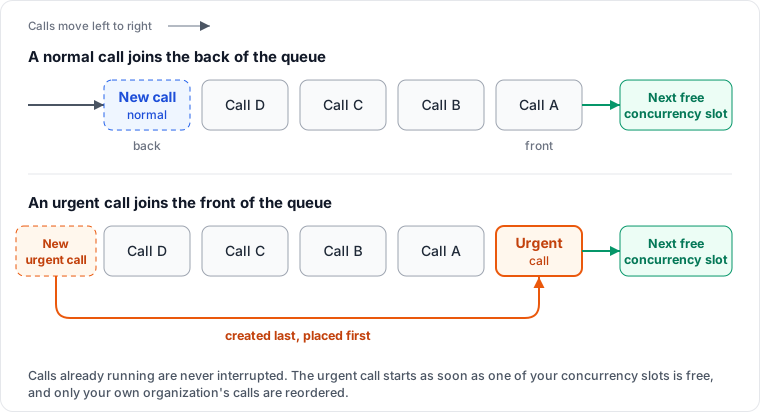
- It changes queue position only. An urgent call starts as soon as one of your concurrency slots is free. If every slot is busy, it waits for the next call to end, then goes first. It does not raise your concurrency limit or skip any other check.
- It only reorders your own calls. Each organization has its own queue, so urgent calls never affect another organization.
- Urgent calls are ordered among themselves by creation time. If every call is marked urgent, they’re placed in the order they were created, the same as if none were.
- Set it when you create the call. A call that is already queued can’t be made urgent. Campaign calls don’t accept it.
- Only
normalandurgentare accepted. Any other value returns400("priority must be one of: normal, urgent"). Omitting the field is the same asnormal.
Personalization (passing per-call variables)
Pass variables to carry caller-specific values into the conversation - names, lead source, amounts, anything the agent should reference.
- Scalar values only.
string,number,boolean. Nested objects are rejected withHTTP 400("Invalid input") - flatten the payload client-side (address_cityinstead ofaddress: { city: ... }). - Variables are persisted with the call. They appear on the conversation log at
data.variablesand can be retrieved viaGET /conversation/{id}.
See Variables for the agent-side guide to defining and referencing variables.
Response
Save this ID to retrieve transcripts and analytics later.
Error Handling
Tips
Validate phone numbers first
Use a library like phonenumbers to validate before calling. Invalid numbers waste API calls.
Add delays between calls
Wait 5-10 seconds between calls to avoid rate limits.
Store conversation IDs
Save them in your database to retrieve transcripts later.
Handle errors gracefully
Wrap calls in try/except and log failures for retry.