
Telephony: Alohaa
Alohaa provides virtual phone numbers and SIP trunking for Indian telephony. Connecting Alohaa to Smallest AI lets your voice agents answer inbound calls and place outbound calls on Indian numbers, with inbound and outbound routed over separate trunks so you can scale and rate-limit each direction independently.
Before you configure anything on Smallest AI, you need virtual numbers and SIP trunk details from Alohaa. To purchase numbers or discuss volume requirements, visit alohaa.ai or contact support@alohaa.ai.
Before you start
Collect these four items from Alohaa. Every field you fill in on Smallest AI comes from one of them.
Every number must include the +91 country code. Enter +91826690XXXX, not 826690XXXX or 91826690XXXX. Our SIP ingress matches on the +-prefixed E.164 number. Without the +, an inbound call reaches us but does not map to your agent, and the call is rejected.
Decide which trunks you need
Inbound and outbound are separate objects on Smallest AI. Create only what you need.
Configure the trunks
Open SIP Trunks
- Log in to your Smallest AI dashboard.
- In the left navigation, go to Deploy → SIP Trunks.
Create your trunk(s)
Create only the direction(s) you need, per Decide which trunks you need.
Outbound
Inbound
An outbound trunk lets your agents place calls using your Alohaa numbers as the caller ID.
Click New outbound trunk and complete the form:
Click Create outbound trunk to save, or Cancel to discard.
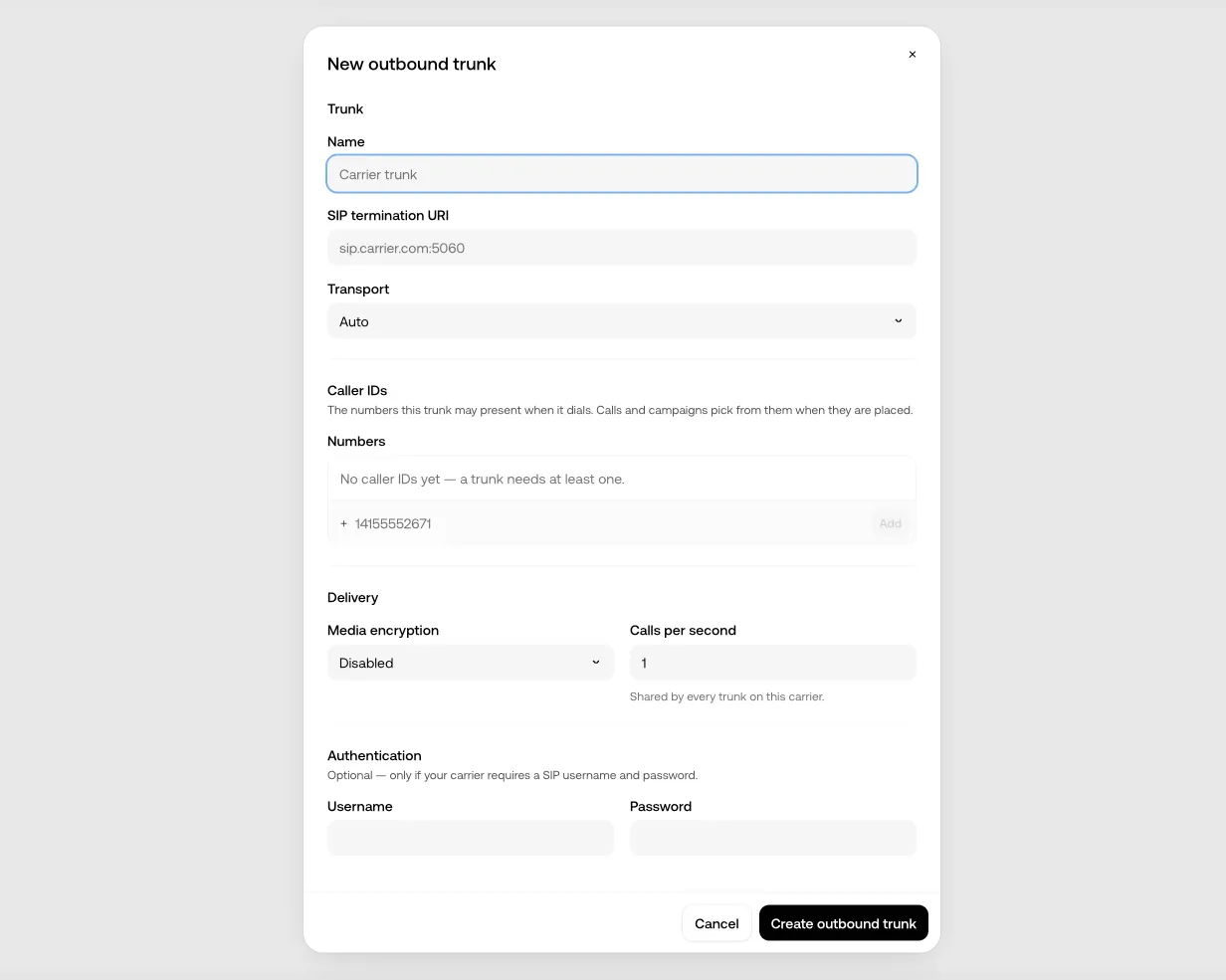
Set Calls Per Second to the value Alohaa gave you, not higher. Exceeding your allocated CPS causes Alohaa to reject calls at the carrier level, which surfaces as failed outbound attempts with no clear error on the Smallest AI side.
Confirm the inbound transport with Alohaa
This step is not on the Smallest AI dashboard, but it prevents the hardest failure to debug.
Our SIP ingress accepts UDP, TCP, and TLS, and we recommend Alohaa sends inbound calls over TCP (5060) or TLS (5061). Over UDP, a full-size INVITE can fragment on the path and many networks silently discard the fragments, so calls time out with no error while small requests still get through. Confirm with Alohaa which transport the trunk sending calls to Smallest AI uses.
The Transport: UDP setting on the outbound trunk applies only to the outbound direction, where Smallest AI sends INVITEs to Alohaa’s termination host. It does not control how Alohaa sends inbound calls to us; that transport is configured on Alohaa’s side.
For the full transport contract and packet-level debugging, see SIP Trunking.
Attach the trunk to an agent
A configured trunk carries calls, but until an agent answers on it, calls arriving on it are rejected.
Open your agent’s Telephony tab and add the Alohaa number (or the inbound trunk) as an answering source. Each number or trunk is answered by exactly one agent; an agent can answer on many. If the agent will transfer calls, also set its transfer caller ID on the same tab.
Test both directions
- Inbound. Call your Alohaa number from a real phone. The agent should answer and audio should flow both ways.
- Outbound. Place a call from the agent, either from the dashboard or via POST /conversation/outbound, and confirm Alohaa bills it to your termination trunk.
- Check audio in both directions on each call, not just that the call connects. If either direction fails, see Troubleshooting.
Configuration reference
Every Alohaa-specific value in one place.
Troubleshooting
The SIP Trunks option is not in my dashboard
Either your role does not include SIP trunk management or the feature is not enabled for your organization. Confirm you are a System Administrator under Organization Members, then contact support@smallest.ai.
Inbound call connects but there is only silence
Two causes account for most cases.
Alohaa is sending over UDP and the INVITEs fragment. A full-size INVITE can exceed what a UDP datagram survives on the path; fragments get silently discarded, so Alohaa’s SBC retransmits and times out while small requests (an OPTIONS ping) still succeed. Ask Alohaa to switch the trunk to TCP on 5060 or TLS on 5061.
The number is missing the +. An INVITE with To: sip:91826690XXXX@... reaches our ingress but does not match a mapped number. Check that the number on your inbound trunk is stored as +91826690XXXX and that Alohaa sends the + on the request URI.
For packet captures and sipsak checks, see SIP Trunking.
Inbound call is rejected before it reaches the agent
Check Allowed Peer Addresses on your inbound trunk. It has to match the host Alohaa actually sends from. If Alohaa routes through more than one PBX host, add each one. A mismatch here rejects the call at the trunk boundary, before agent routing.
Outbound calls fail or are throttled
Check Calls Per Second against the limit Alohaa allocated. Set higher than your allocation, calls get rejected by the carrier with no clear error surfaced on our side.
Also confirm the SIP Termination URI matches the host Alohaa provided. A sip: prefix is accepted and stripped automatically; the bare host (pbx6.alohaa.ai) is the canonical form.
Calls connect but the caller ID is wrong
Every number you want to present as a caller ID has to be listed under Caller IDs (Numbers) on the outbound trunk, in +91 E.164 format. A number that is not on the trunk cannot be used as the caller ID for that trunk.
Numbers are rejected at save time
The form validates E.164 format. Enter +91826690XXXX. Values without the +, with spaces, or with punctuation are refused.
Related pages
Need help?
For issues configuring a trunk on Smallest AI, or if SIP Trunks is missing from your dashboard, email support@smallest.ai or join the Discord community.
For number provisioning, CPS allocation, termination URIs, or peer addresses, email support@alohaa.ai.