Skip to navigation

n8n

Automate voice workflows with Smallest AI TTS, STT, and Voice Cloning using the n8n community node.
View as Markdown

Use Smallest AI inside n8n to build no-code and low-code voice automations - transcribe audio, synthesize speech, and clone voices as part of any workflow using the n8n-nodes-smallestai community node.

Installation

In your n8n instance, go to Settings → Community Nodes → Install and search for:
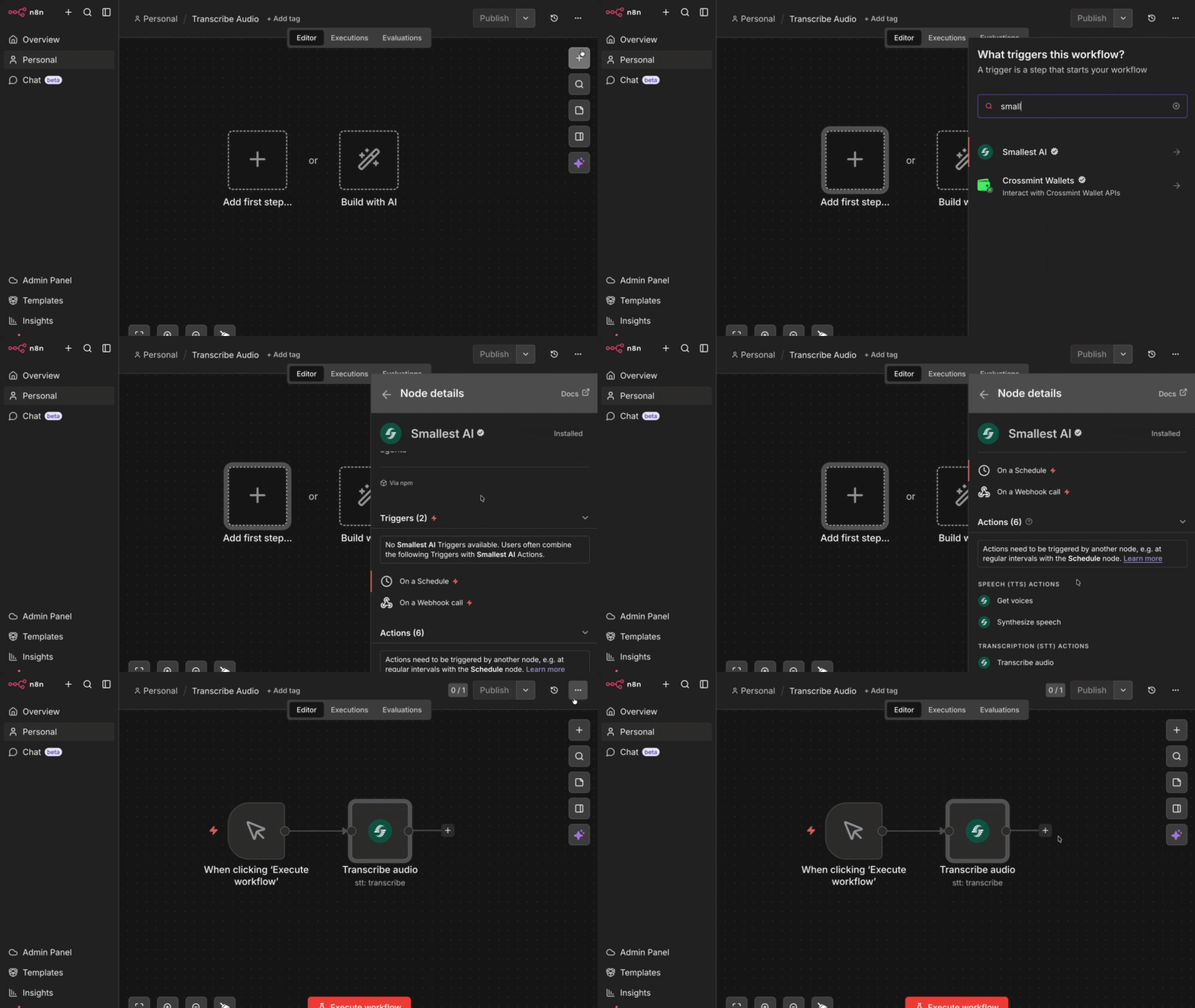
n8n-nodes-smallestai
Searching for n8n-nodes-smallestai in n8n community nodes

Or install via npm (for self-hosted instances):

npm install n8n-nodes-smallestai
Requires n8n v1.x or v2.x and Node.js v22 or higher.

Credentials

1

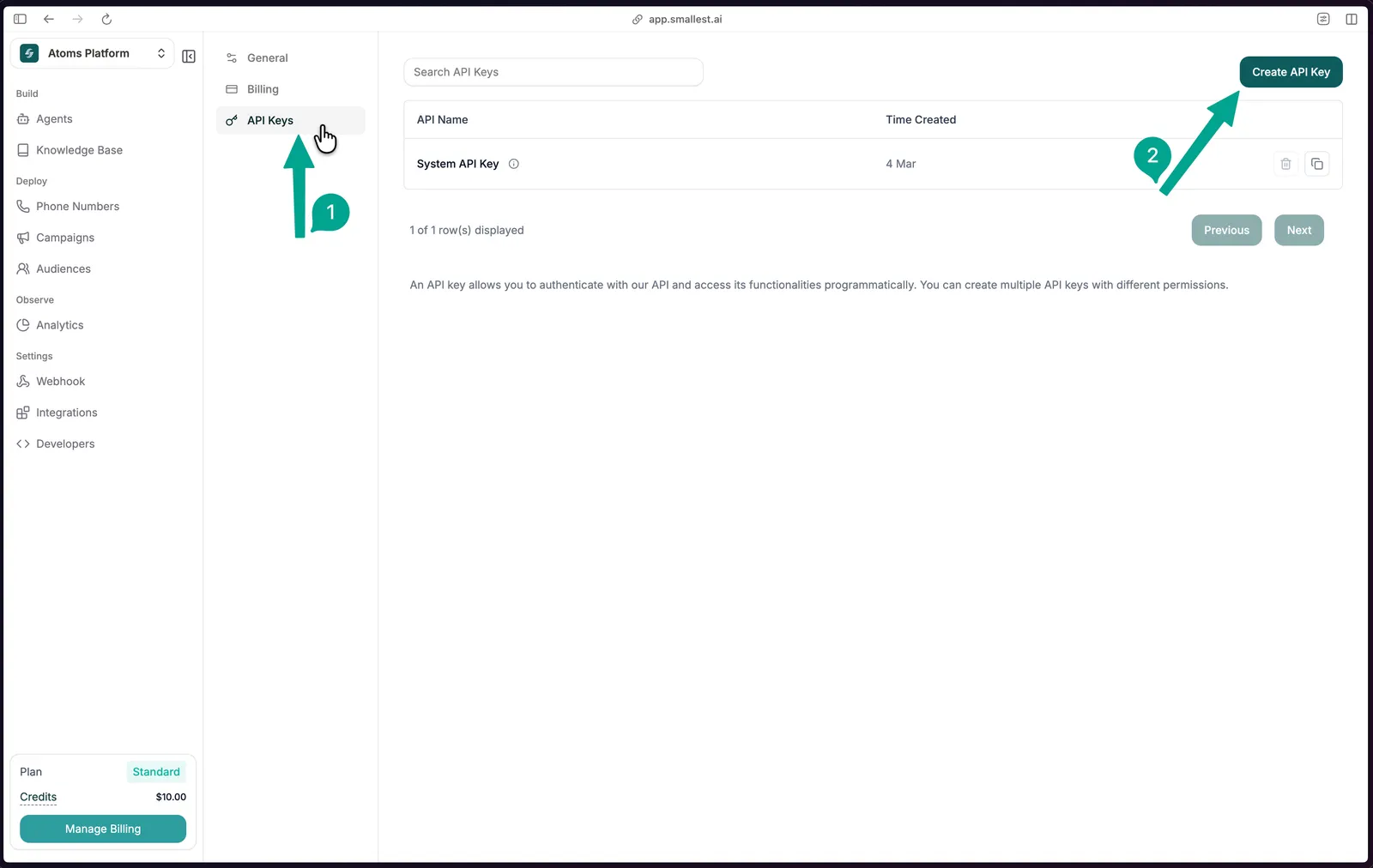
Sign up and navigate to API Keys

Sign up at app.smallest.ai and open the API Keys page directly.

API Keys settings page with Create API Key button highlighted
2

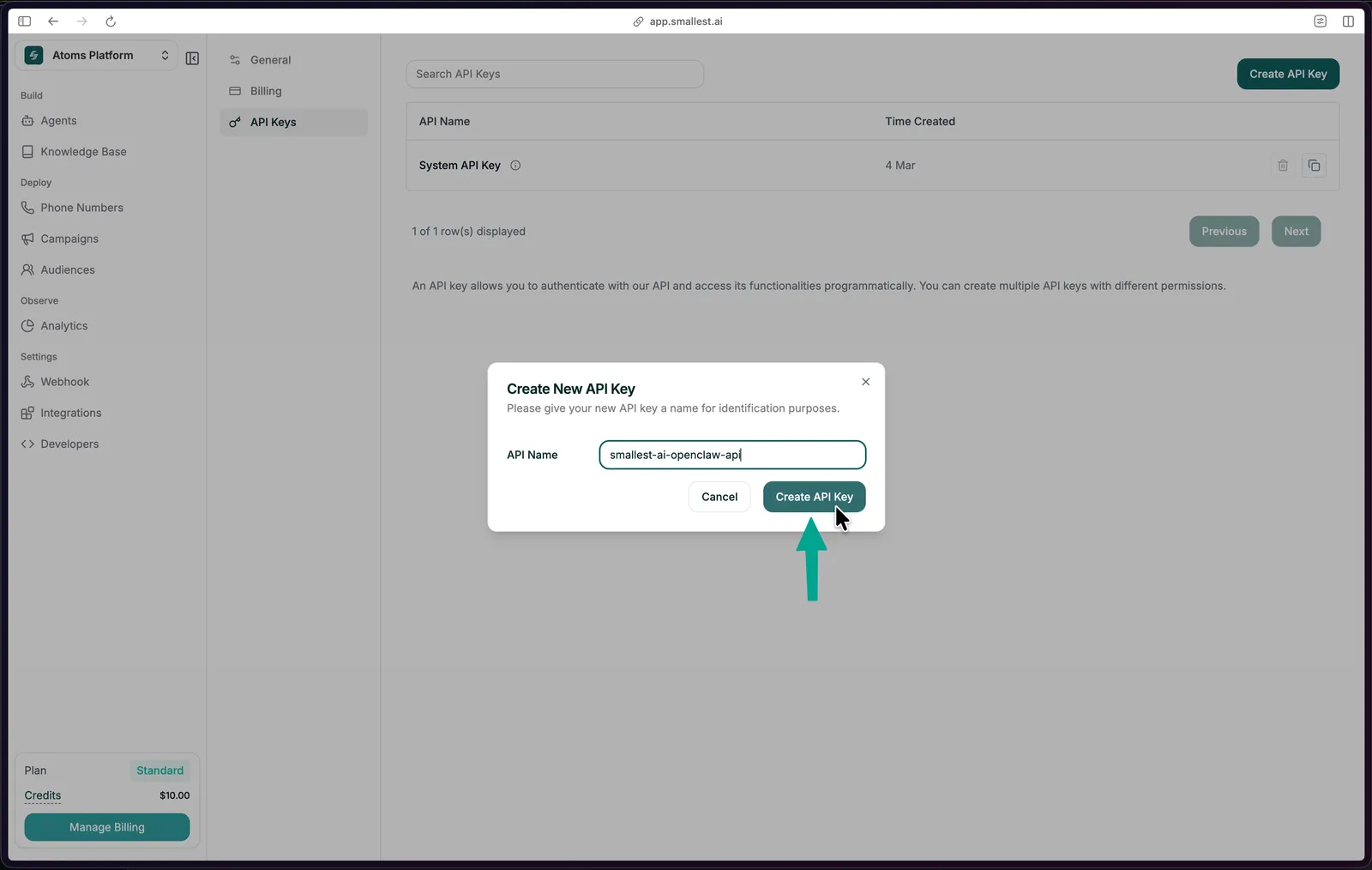
Create a new key

Click Create API Key, give it a name, and copy the key immediately - it won’t be shown again.

Create API Key dialog
3

Add credentials in n8n

In n8n, go to Credentials → New → Smallest.ai API, paste your API key, and save.

Transcribe Audio from a Form

The quickest way to try the node - a form that accepts an audio file upload and returns its transcript via the Smallest AI STT API.

Workflow JSON

Copy and import this directly into n8n via File → Import from JSON:

{
"name": "Transcribe Audio",
"nodes": [
{
"parameters": {
"formTitle": "Sample Audio",
"formDescription": "Upload a sample Audio",
"formFields": {
"values": [
{
"fieldLabel": "audio",
"fieldType": "file",
"acceptFileTypes": ".mp3, .wav"
}
]
},
"options": {}
},
"type": "n8n-nodes-base.formTrigger",
"typeVersion": 2.5,
"position": [-144, -48],
"id": "012e15bf-7dea-401f-87d8-36859543bf21",
"name": "On form submission"
},
{
"parameters": {
"resource": "stt",
"binaryPropertyName": "audio",
"additionalOptions": {}
},
"type": "n8n-nodes-smallestai.smallestai",
"typeVersion": 1,
"position": [112, -48],
"id": "b2398e55-5ed0-4e0e-915b-180d17525b42",
"name": "Transcribe audio",
"credentials": {
"smallestaiApi": {
"id": "AuVcs5R2gmnnsCxk",
"name": "Smallest.ai account"
}
}
}
],
"pinData": {},
"connections": {
"On form submission": {
"main": [
[
{
"node": "Transcribe audio",
"type": "main",
"index": 0
}
]
]
}
},
"active": false,
"settings": {
"executionOrder": "v1",
"binaryMode": "separate"
},
"tags": []
}

Node Configuration

FieldValue
ResourceTranscription (STT)
OperationTranscribe Audio
Binary Propertyaudio

Optional enrichment under Additional Options:

OptionDefaultDescription
languageenUse auto for multilingual detection
gender_detectionfalseDetect speaker gender
emotion_detectionfalseDetect emotional tone

Operations

The Smallest AI node exposes three resources:

ResourceOperationDescription
Speech (TTS)Synthesize SpeechConvert text to audio (MP3, WAV, PCM, Mulaw)
Speech (TTS)Get VoicesList available voices for a model
Transcription (STT)Transcribe AudioTranscribe an audio file to text
Voice CloneAdd VoiceClone a voice from an audio file
Voice CloneGet Cloned VoicesList all your cloned voices
Voice CloneDelete Cloned VoiceRemove a cloned voice by ID

Speech-to-Text (STT)

Transcribe audio in 20+ languages. The node reads binary audio data from a previous step and sends it to the Smallest AI STT API.

Read/Download Audio → Smallest AI (Transcribe Audio) → Use transcript

Supported languages: English, Hindi, Spanish, French, German, Bengali, Marathi, Gujarati, and more (21 streaming + 12 pre-recorded languages). See the Pulse model card for the full list. Set language to a regional aggregator (north_indic, multi-eu, multi-asian) for automatic detection within a language family.

Optional detections:

OptionFieldDefault
Spoken languagelanguageen
Speaker gendergender_detectionfalse
Emotional toneemotion_detectionfalse

Text-to-Speech (TTS)

Convert any text to audio using Lightning V3.1. The node outputs binary audio data you can save, email, or pass downstream.

Trigger / Data → Smallest AI (Synthesize Speech) → Save / Send audio

Configuration:

FieldOptionsDefault
Modellightning-v3.1lightning-v3.1
Voice217 voices across 12 languagesavery
Output Formatmp3, wav, pcm, ulaw, alawwav
Sample Rate8000, 16000, 24000, 4410044100
Speed0.5 – 2.01.0

Popular voices:

VoiceGenderAccent
sophiaFemaleAmerican
robertMaleAmerican
advikaFemaleIndian
vivaanMaleIndian
camillaFemaleMexican/Latin

Voice Cloning

Clone a voice from an audio sample, then use the returned voice ID in any TTS step.

Upload Audio → Smallest AI (Add Voice) → Store Voice ID
Text input → Smallest AI (Synthesize Speech, Custom Voice ID) → Audio output

Set Voice Source to Custom in the TTS node and paste the cloned voice ID.

Use Case Ideas

Use CaseFlow
Meeting transcriptionDownload recording → Transcribe → Save to Notion / Sheets
Voice support ticketsReceive voice message → Transcribe → Route to agent
Voice note → summaryReceive audio → Transcribe → Summarise with AI
Podcast indexingNew episode → Transcribe → Push to CMS / search index
Multilingual IVR QAPull calls → Transcribe (auto) → Emotion flag → QA review
Lecture captureUpload recording → Transcribe → Format notes → Email

Notes

  • Audio must be passed as binary data in n8n. Use nodes like Read/Write Files, HTTP Request, or Form Trigger to load audio into the pipeline before the Smallest AI node.
  • For the form-based workflow, the Binary Property field in the STT node must exactly match the label of the file upload field in your form.
  • The node is compatible with n8n’s AI Agent tool interface (usableAsTool: true) - you can use it as a tool inside an AI agent workflow.