

How to Create a Professional Voice Clone
In this tutorial, you will learn how to use the Smallest AI platform to create a professional voice clone by uploading an audio file.
Creating a Professional Voice Clone
-
Go to the Smallest AI Platform
Navigate to smallest.ai and click on Create New. In the modal that appears, select Professional Voice Clone. This will direct you to the setup page: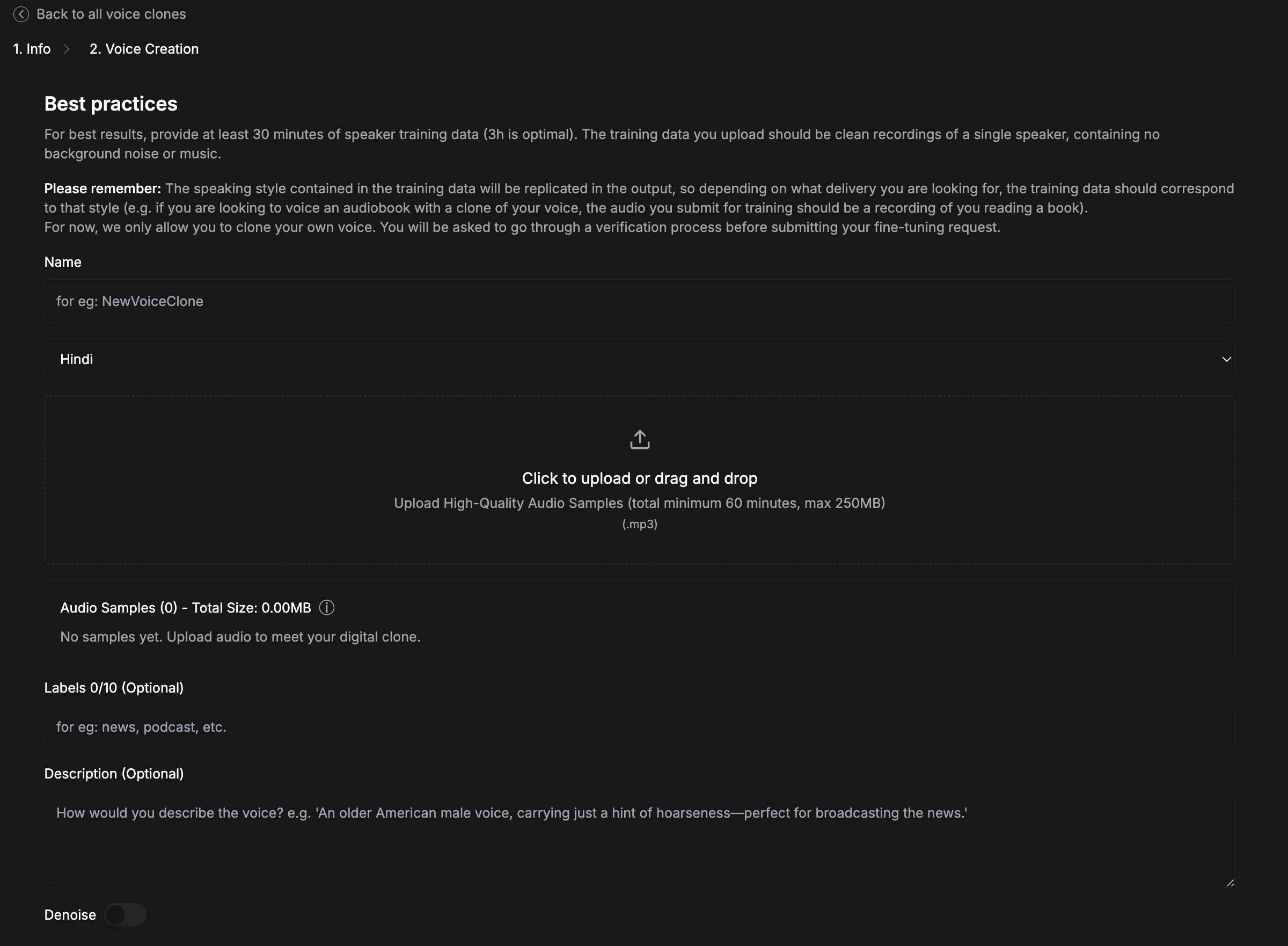
-
Upload Your Audio File
Follow the instructions provided on the page to upload your audio file. Ensure that the recording is clear for the best results. -
Enable Denoise (Optional)
If your audio contains background noise, toggle Denoise on to improve quality. -
Wait for Model to get trained
The voice cloning process typically takes 3 to 6 hours, but may take longer depending on demand. The Voice Clone will be available to Use on platform and you will also get mail for that.
Note:
Creation of Professional Voice Clones (PVC) is not available via the SDK due to the requirement of larger audio files. Please use the Smallest AI platform for this process.
If you have any questions or run into any issues, our community is here to help!
- Join our Discord server to connect with other developers and get real-time support.
- Reach out to our team via email: support@smallest.ai.