

Multi-checkpoint deployment
Multi-checkpoint deployment
The multi-checkpoint pattern is how you deploy Pulse STT on-prem when you need more languages than a single checkpoint covers. Each deployment is a self-contained stack — one API server, one model server hosting up to three checkpoints — and deployments don’t talk to each other. Scaling, failure isolation, and resource budgeting are all per-deployment.
Why one API server per model server
Most multi-model serving designs centralize routing: a global load balancer keeps a registry of which checkpoint lives on which replica and forwards each request accordingly. That works, but the coordination overhead grows fast as checkpoints and replicas multiply, and a routing-layer bug can affect every deployment at once.
The multi-checkpoint pattern flips that: routing across language families becomes the client’s problem, but routing within a deployment is local and trivial. The API server only knows about the checkpoints loaded into its own paired model server. There’s no shared state, no global registry, and no cross-deployment hops. The blast radius of any change — config rollout, autoscaling, model swap — stays bounded to one deployment.
For most on-prem customers this is a better fit than centralized routing:
- Language packs ship and scale independently. The Indic pack can scale to 10 replicas during peak hours without touching the Western pack.
- A bad model rollout to Deployment 2 cannot break Deployment 1.
- Cost attribution is straightforward: each deployment’s resources map to one set of languages.
- There is no global service to operate. The whole platform is N copies of the same simple two-container pattern.
Architecture
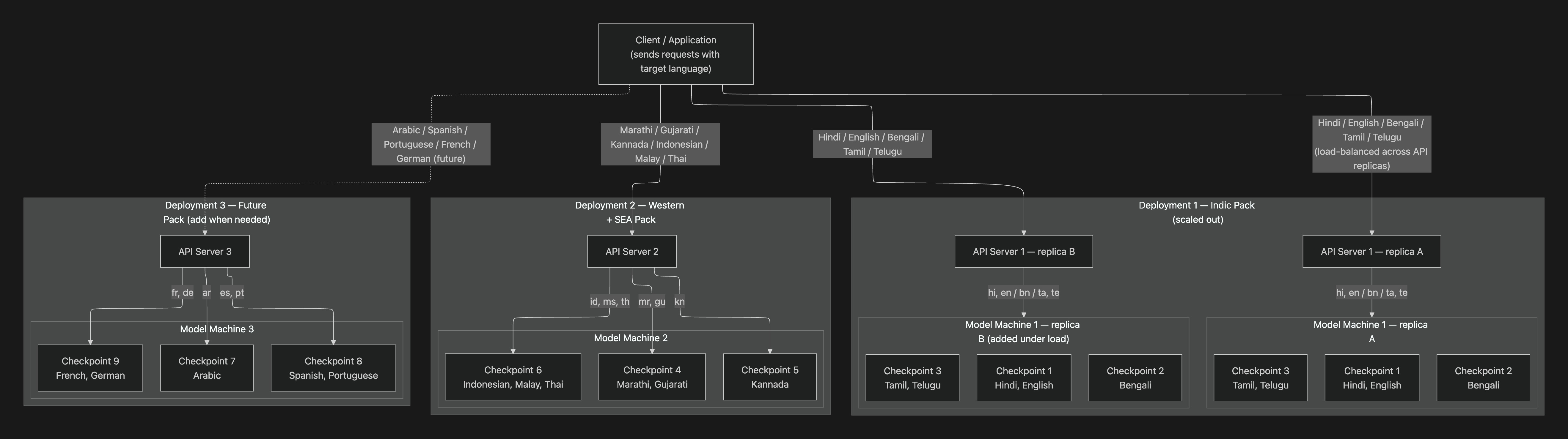
The diagram shows three deployments serving different language families:
- Deployment 1 (Indic Pack): Hindi, English, Bengali, Tamil, Telugu — horizontally scaled to two replicas under load. The client load-balances across
replica Aandreplica B; each replica loads the same three checkpoints, so either can serve any Indic request. - Deployment 2 (Western + SEA Pack): Marathi, Gujarati, Kannada, Indonesian, Malay, Thai — single replica.
- Deployment 3 (Future Pack): Arabic, Spanish, Portuguese, French, German — added when needed.
The language groupings are illustrative. Actual checkpoint composition is decided per training run based on model quality and GPU memory budget. A single checkpoint can serve multiple languages if it was trained that way (most Indic and EU checkpoints are multilingual), so three checkpoints can cover well more than three languages.
What each deployment contains
Two containers, paired 1:1:
Two more containers are shared across every deployment:
Loading checkpoints — the MODEL_URL knob
The model image accepts a MODEL_URL environment variable as a comma-separated list of up to three checkpoint URLs. The container reads it on startup and sizes its concurrency automatically based on how many checkpoints it sees:
The total concurrency budget is approximately constant — the model server splits its GPU and memory roughly evenly across checkpoints. Loading three checkpoints does not give you 3× capacity; it gives you broader language coverage at the cost of per-checkpoint throughput. Plan checkpoint composition with that tradeoff in mind: rare-language checkpoints can share a deployment; high-traffic ones should get their own.
Routing — split responsibility
Routing happens in two places:
Inside a deployment (we handle). When a request comes in tagged with a target language, the API server looks at what’s loaded on its paired model server and picks the right checkpoint. If a dedicated checkpoint exists for that language, it goes there. If not, the request falls back to a multilingual checkpoint that covers the language. The client just specifies language=hi and gets routed correctly inside Deployment 1.
Across deployments (the client handles). Each deployment exposes its own URL. The client must know which deployment serves which languages and forward each request accordingly. There’s no cross-deployment routing layer — by design.
A minimal Python router looks like this:
For production you’d typically put a small dispatcher service or an API-gateway routing rule in front of this map. The point is: the routing logic is a flat dict, not a service that needs to track replica health or do consistent hashing.
docker-compose.yml — two-deployment reference
This is the minimum config to run two independent deployments on a single host. To add a third, duplicate the asr-N + api-server-N pair with new service names and host ports.
A few details worth calling out:
- Each
api-server-Nhas its ownASR_BASE_URLpointing at its pairedasr-N. This is the single most important line — getting it wrong (e.g. pointingapi-server-2atasrinstead ofasr-2) is the most common misconfiguration. PYTORCH_CUDA_ALLOC_CONF=expandable_segments:Truekeeps GPU memory fragmentation in check when loading multiple checkpoints. Leave it on.license-proxyandredisare shared, not duplicated. Spinning up extra copies adds cost without benefit; they’re not on the per-request hot path.- Host ports differ per deployment (
7100,7101, …). The internal container port7100stays the same; only the published port changes.
Request flow
- The client looks up the target language in its routing map and selects the deployment URL (
api-d1.smallest.aifor Hindi,api-d2.smallest.aifor Marathi, etc.). - The request hits that deployment’s
api-server, carrying thelanguageparameter (and any other Pulse STT options —word_timestamps,diarize,keywords, etc.). - The API server forwards to its paired model server (
asr:2233). If a dedicated checkpoint for the requested language is loaded, the request goes there. If not, it falls back to a multilingual checkpoint that covers the language. - The model server runs inference and streams the transcript back. For REST, the API server buffers and returns one response; for the WebSocket endpoint, partials stream as they’re produced.
No cross-deployment hops, no global checkpoint registry, no shared cache that needs to know which model is loaded where.
Scaling
Each deployment scales independently. Triggers are local:
- A traffic spike on Deployment 1 (Indic) scales up
asrandapi-serverreplicas using that deployment’s own HPA / autoscaler rules. Deployment 2 (Western + SEA) is completely unaffected — its replica count, GPU cost, and capacity stay exactly as they were. - Every model replica in a deployment loads the same set of checkpoints, so any API replica in front of them can serve any request. Load balancing is round-robin or least-connections; no checkpoint-aware routing required.
- Adding a new language family is a new deployment, not a redeploy of the existing one. Deployment 3 (Future Pack in the diagram) goes from zero to serving traffic without touching Deployments 1 or 2.
If a single checkpoint’s traffic outgrows what a 3-checkpoint deployment can serve at 48 concurrency each, the standard move is to give it its own deployment with a single checkpoint loaded (concurrency goes back to 128). That’s a config change — same image, different MODEL_URL.
Adding a new deployment
- Duplicate the
asr-N+api-server-Npair indocker-compose.yml. Pick new host ports (e.g.7102,2235) and a new service name suffix. - Set
MODEL_URLon the newasr-Nto the checkpoint(s) you want it to serve. - Point the new
api-server-N’sASR_*_BASE_URLvariables at the newasr-Nservice (not atasr). docker compose up -d asr-N api-server-N.- Add the new languages to your client’s routing map. The new deployment is live.
license-proxy and redis keep running as-is. No restart of existing deployments is required.
Common pitfalls
api-server-Npointing at the wrongasr. Symptom: requests succeed but always come back with the wrong language transcript, or a language you didn’t load. Fix: re-checkASR_BASE_URLand friends — they must match the pairedasr-N.- Loading 3 checkpoints when you only need 1. Symptom: lower per-request throughput than expected. Fix: drop down to 1 checkpoint if all your traffic is one language family; the concurrency budget triples.
- Treating
license-proxyas a per-deployment service. It isn’t. One instance, every API server connects to it. Running multiple wastes resources and complicates license accounting. - Forgetting that
MODEL_URLis a startup-only knob. The list is read once at container boot. Hot-reloading checkpoints requires restarting theasrcontainer.
Related
- Quick start — minimum single-deployment setup
- Configuration reference — all environment variables documented
- Troubleshooting — common deploy issues