n8n

View as Markdown

Use Smallest AI inside n8n to build no-code and low-code voice automations - transcribe audio, synthesize speech, and clone voices as part of any workflow using the n8n-nodes-smallestai community node.

Installation

In your n8n instance, go to Settings → Community Nodes → Install and search for:
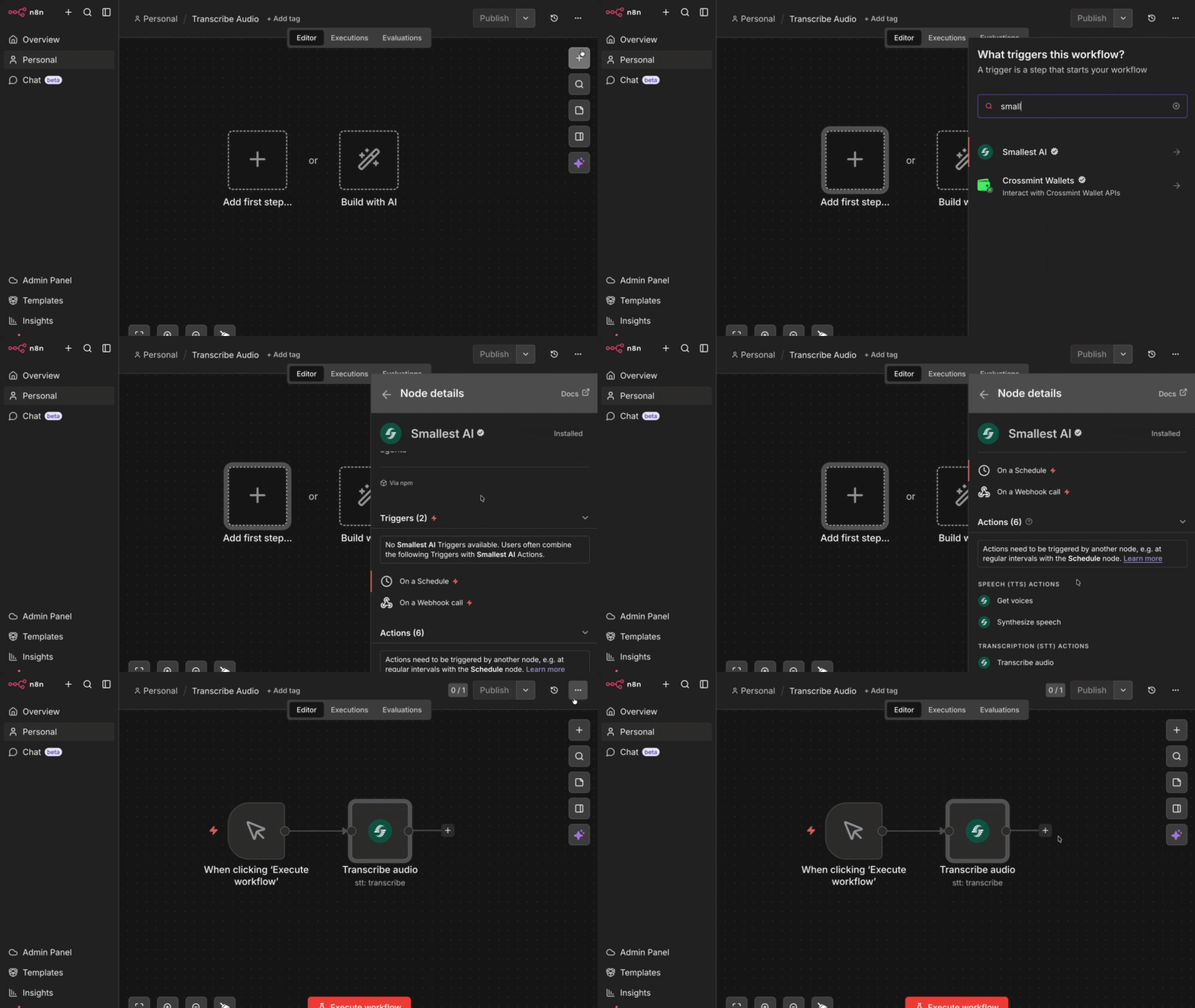
n8n-nodes-smallestai
Searching for n8n-nodes-smallestai in n8n community nodes

Or install via npm (for self-hosted instances):

npm install n8n-nodes-smallestai
Requires n8n v1.x or v2.x and Node.js v22 or higher.

Credentials

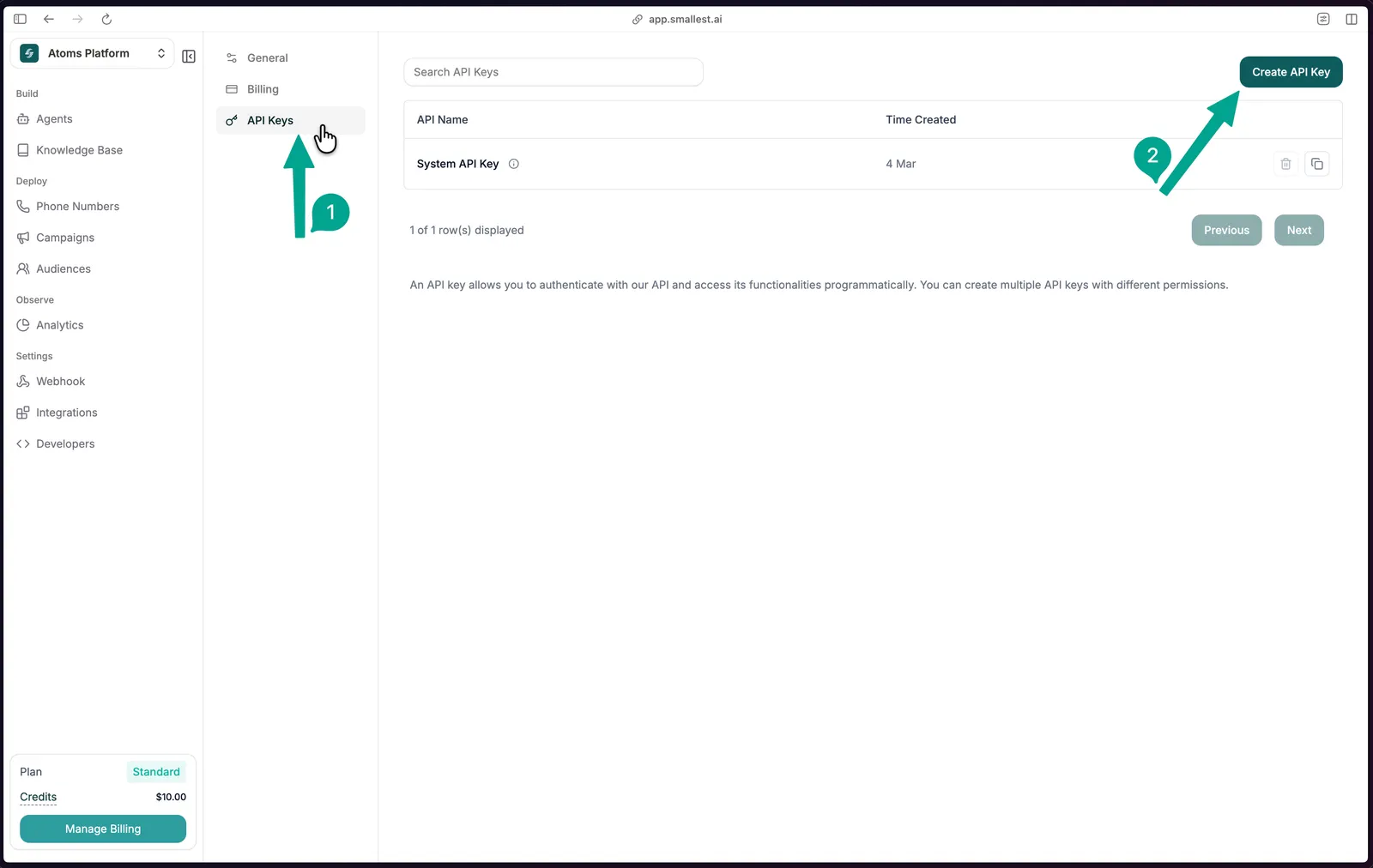
1

Sign up and navigate to API Keys

Sign up at app.smallest.ai and open the API Keys page directly.

API Keys settings page with Create API Key button highlighted
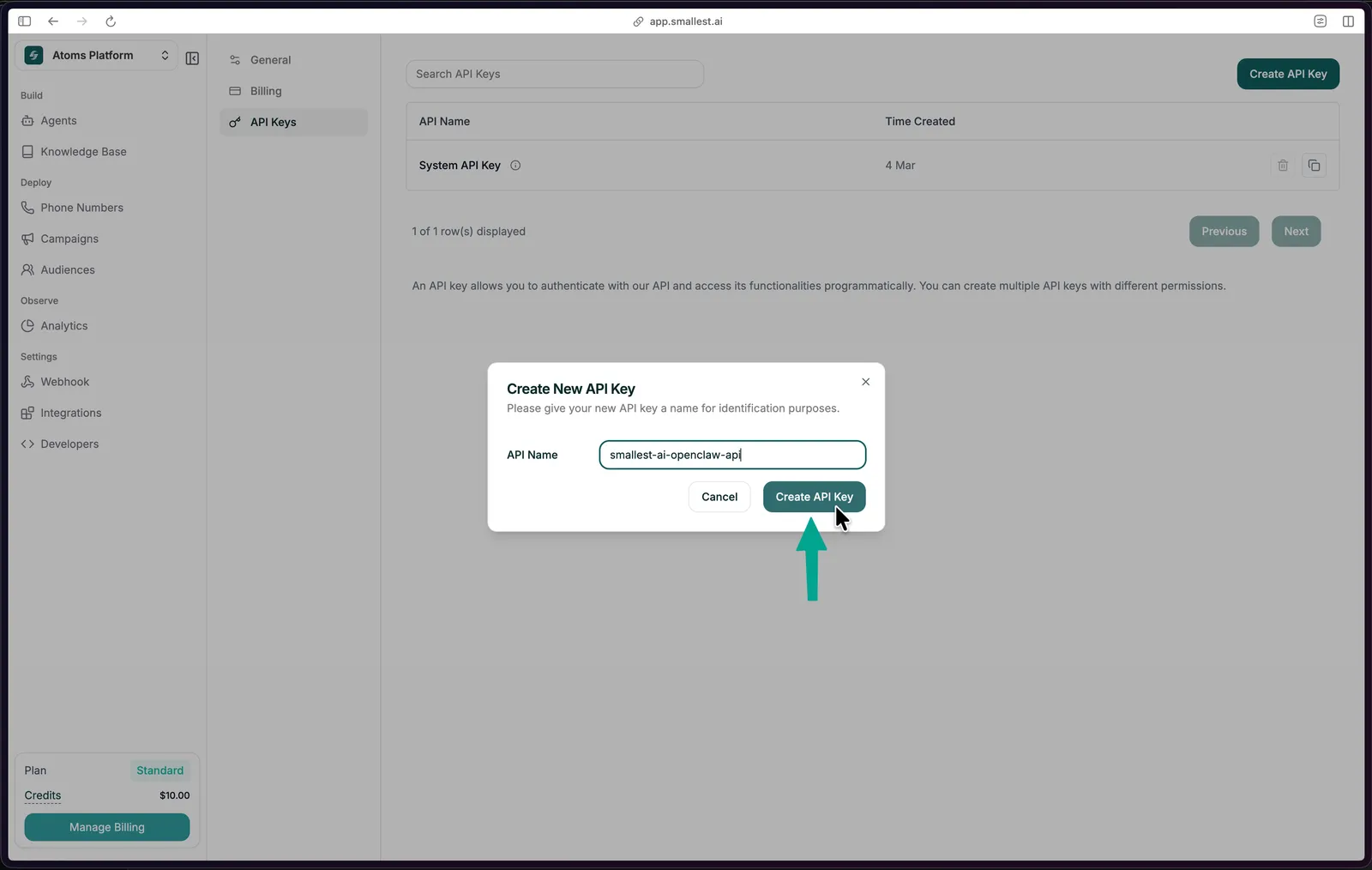
2

Create a new key

Click Create API Key, give it a name, and copy the key immediately - it won’t be shown again.

Create API Key dialog
3

Add credentials in n8n

In n8n, go to Credentials → New → Smallest.ai API, paste your API key, and save.

Transcribe Audio from a Form

The quickest way to try the node - a form that accepts an audio file upload and returns its transcript via the Smallest AI STT API.

Workflow JSON

Copy and import this directly into n8n via File → Import from JSON:

{
"name": "Transcribe Audio",
"nodes": [
{
"parameters": {
"formTitle": "Sample Audio",
"formDescription": "Upload a sample Audio",
"formFields": {
"values": [
{
"fieldLabel": "audio",
"fieldType": "file",
"acceptFileTypes": ".mp3, .wav"
}
]
},
"options": {}
},
"type": "n8n-nodes-base.formTrigger",
"typeVersion": 2.5,
"position": [-144, -48],
"id": "012e15bf-7dea-401f-87d8-36859543bf21",
"name": "On form submission"
},
{
"parameters": {
"resource": "stt",
"binaryPropertyName": "audio",
"additionalOptions": {}
},
"type": "n8n-nodes-smallestai.smallestai",
"typeVersion": 1,
"position": [112, -48],
"id": "b2398e55-5ed0-4e0e-915b-180d17525b42",
"name": "Transcribe audio",
"credentials": {
"smallestaiApi": {
"id": "AuVcs5R2gmnnsCxk",
"name": "Smallest.ai account"
}
}
}
],
"pinData": {},
"connections": {
"On form submission": {
"main": [
[
{
"node": "Transcribe audio",
"type": "main",
"index": 0
}
]
]
}
},
"active": false,
"settings": {
"executionOrder": "v1",
"binaryMode": "separate"
},
"tags": []
}

Node Configuration

FieldValue
ResourceTranscription (STT)
OperationTranscribe Audio
Binary Propertyaudio

Optional enrichment under Additional Options:

OptionDefaultDescription
languageenUse auto for multilingual detection
gender_detectionfalseDetect speaker gender
emotion_detectionfalseDetect emotional tone

Operations

The Smallest AI node exposes three resources:

ResourceOperationDescription
Speech (TTS)Synthesize SpeechConvert text to audio (MP3, WAV, PCM, Mulaw)
Speech (TTS)Get VoicesList available voices for a model
Transcription (STT)Transcribe AudioTranscribe an audio file to text
Voice CloneAdd VoiceClone a voice from an audio file
Voice CloneGet Cloned VoicesList all your cloned voices
Voice CloneDelete Cloned VoiceRemove a cloned voice by ID

Speech-to-Text (STT)

Transcribe audio in 20+ languages. The node reads binary audio data from a previous step and sends it to the Smallest AI STT API.

Read/Download Audio → Smallest AI (Transcribe Audio) → Use transcript

Supported languages: English, Hindi, Spanish, French, German, Bengali, Marathi, Gujarati, and more (21 streaming + 26 pre-recorded languages). See the Pulse model card for the full list. Set language to a regional aggregator (north_indic, multi-eu, multi-asian) for automatic detection within a language family.

Optional detections:

OptionFieldDefault
Spoken languagelanguageen
Speaker gendergender_detectionfalse
Emotional toneemotion_detectionfalse

Text-to-Speech (TTS)

Convert any text to audio using Lightning V3.1. The node outputs binary audio data you can save, email, or pass downstream.

Trigger / Data → Smallest AI (Synthesize Speech) → Save / Send audio

Configuration:

FieldOptionsDefault
Modellightning-v3.1lightning-v3.1
Voice217 voices across 12 languagesavery
Output Formatmp3, wav, pcm, ulaw, alawwav
Sample Rate8000, 16000, 24000, 4410044100
Speed0.52.01.0

Popular voices:

VoiceGenderAccent
sophiaFemaleAmerican
robertMaleAmerican
advikaFemaleIndian
vivaanMaleIndian
camillaFemaleMexican/Latin

Voice Cloning

Clone a voice from an audio sample, then use the returned voice ID in any TTS step.

Upload Audio → Smallest AI (Add Voice) → Store Voice ID
Text input → Smallest AI (Synthesize Speech, Custom Voice ID) → Audio output

Set Voice Source to Custom in the TTS node and paste the cloned voice ID.

Use Case Ideas

Use CaseFlow
Meeting transcriptionDownload recording → Transcribe → Save to Notion / Sheets
Voice support ticketsReceive voice message → Transcribe → Route to agent
Voice note → summaryReceive audio → Transcribe → Summarise with AI
Podcast indexingNew episode → Transcribe → Push to CMS / search index
Multilingual IVR QAPull calls → Transcribe (auto) → Emotion flag → QA review
Lecture captureUpload recording → Transcribe → Format notes → Email

Notes

  • Audio must be passed as binary data in n8n. Use nodes like Read/Write Files, HTTP Request, or Form Trigger to load audio into the pipeline before the Smallest AI node.
  • For the form-based workflow, the Binary Property field in the STT node must exactly match the label of the file upload field in your form.
  • The node is compatible with n8n’s AI Agent tool interface (usableAsTool: true) - you can use it as a tool inside an AI agent workflow.