***
title: Quickstart
description: Generate your first speech audio in under 60 seconds with Lightning TTS.
icon: rocket
------------
## Step 1: Get Your API Key
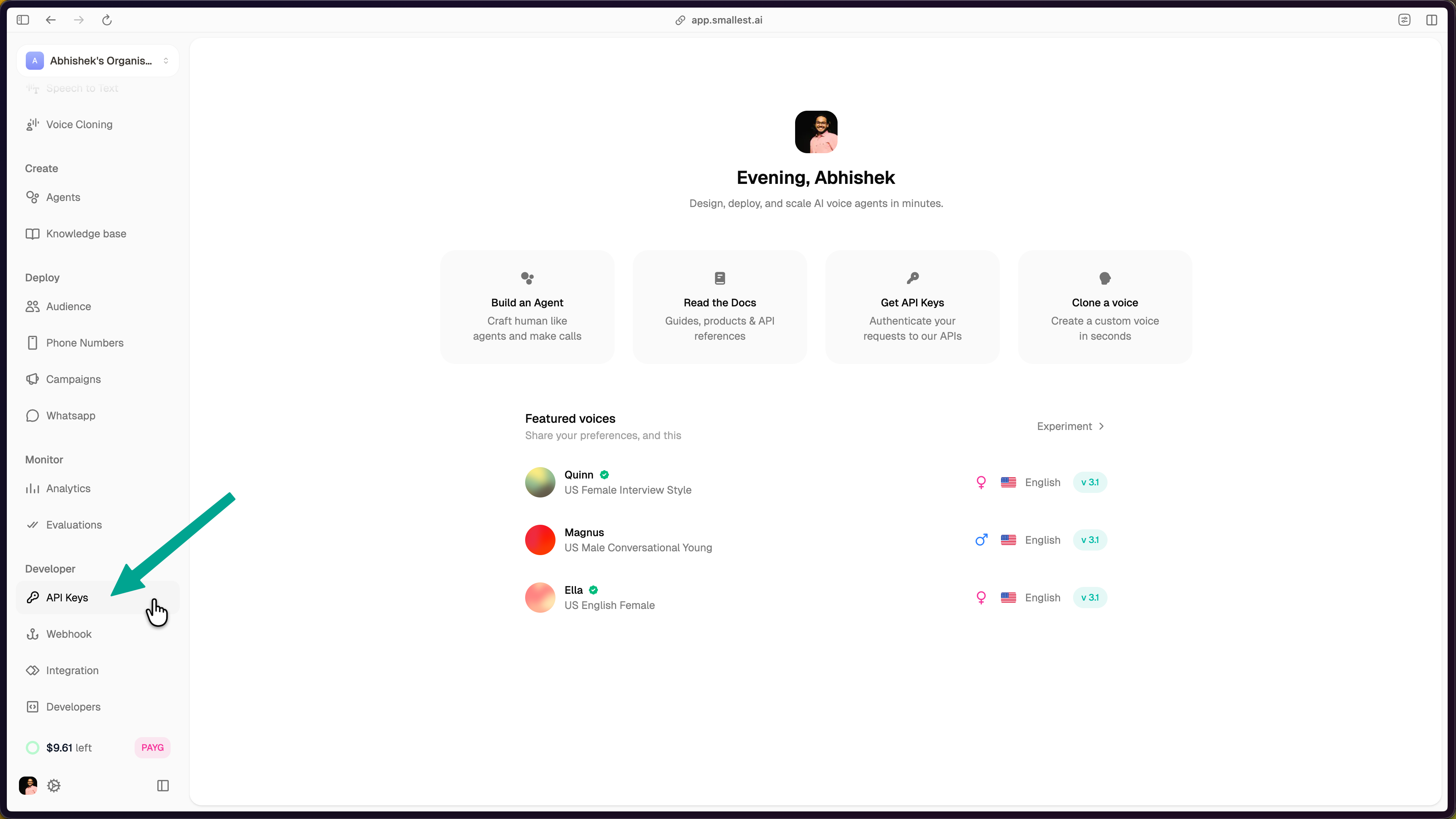
In the [Smallest AI console](https://app.smallest.ai/dashboard), select **API Keys** from the left sidebar under **Developer**.
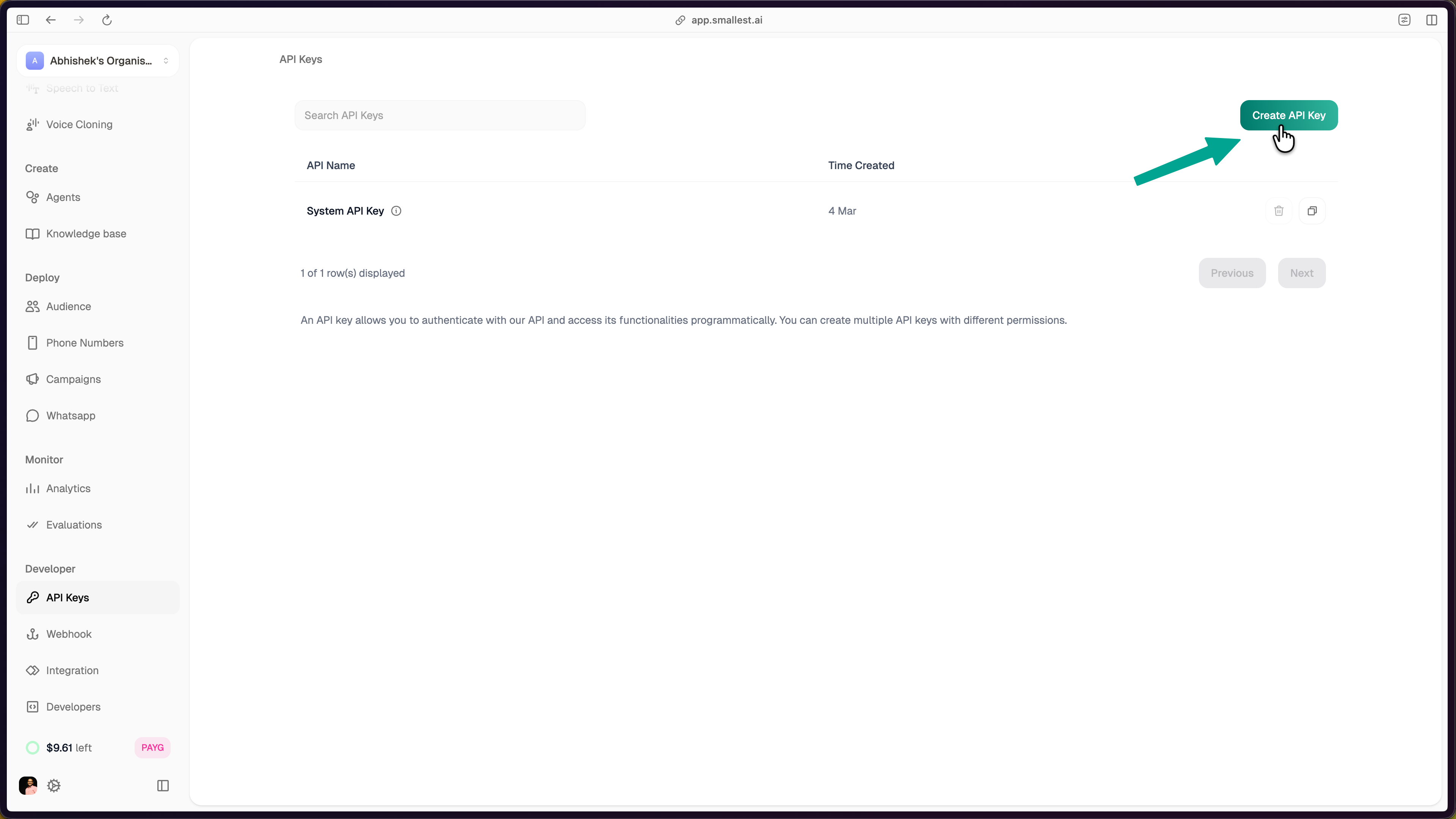
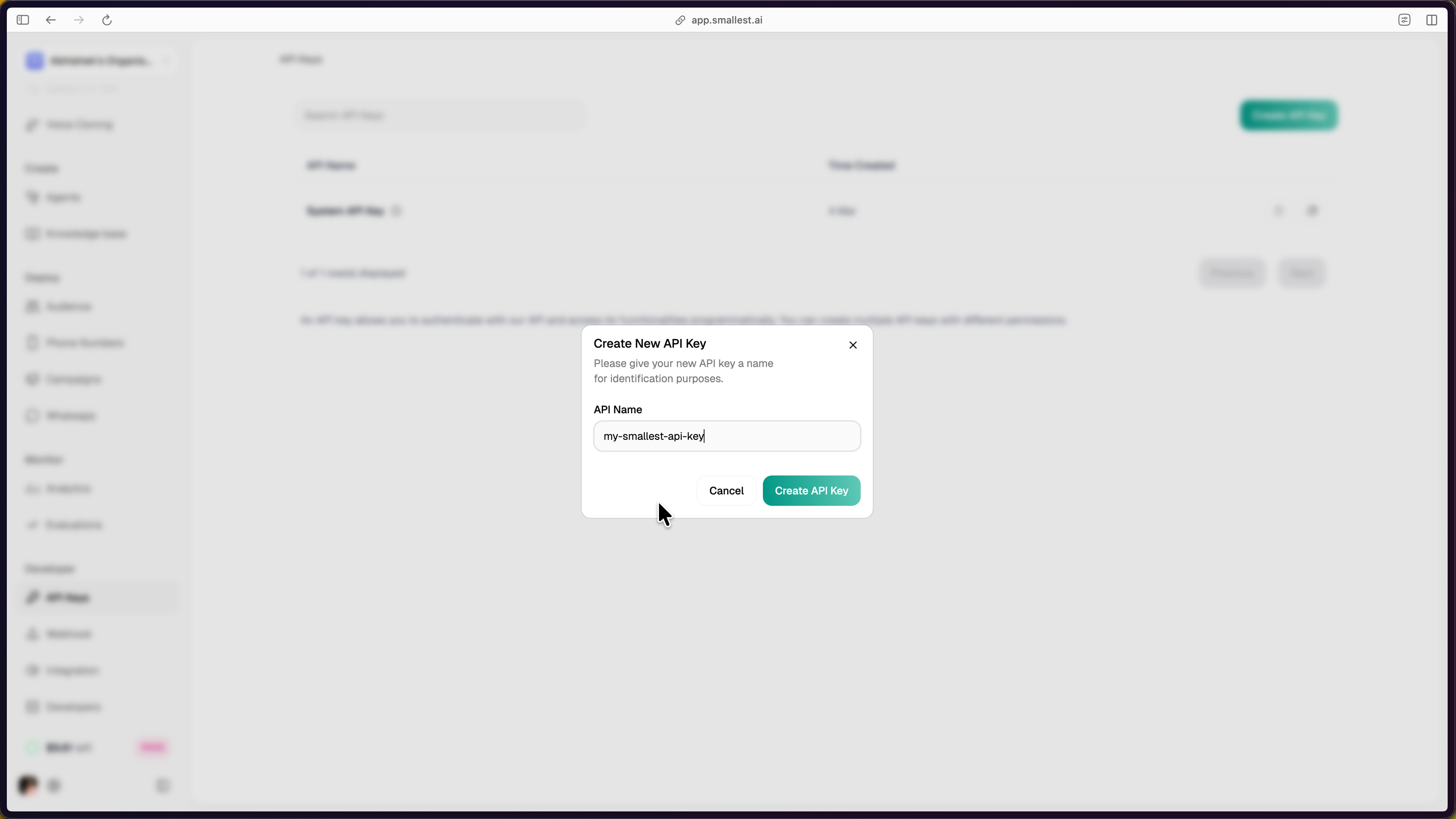
 Click **Create API Key** in the top-right corner, enter a name, and click **Create API Key** to confirm.
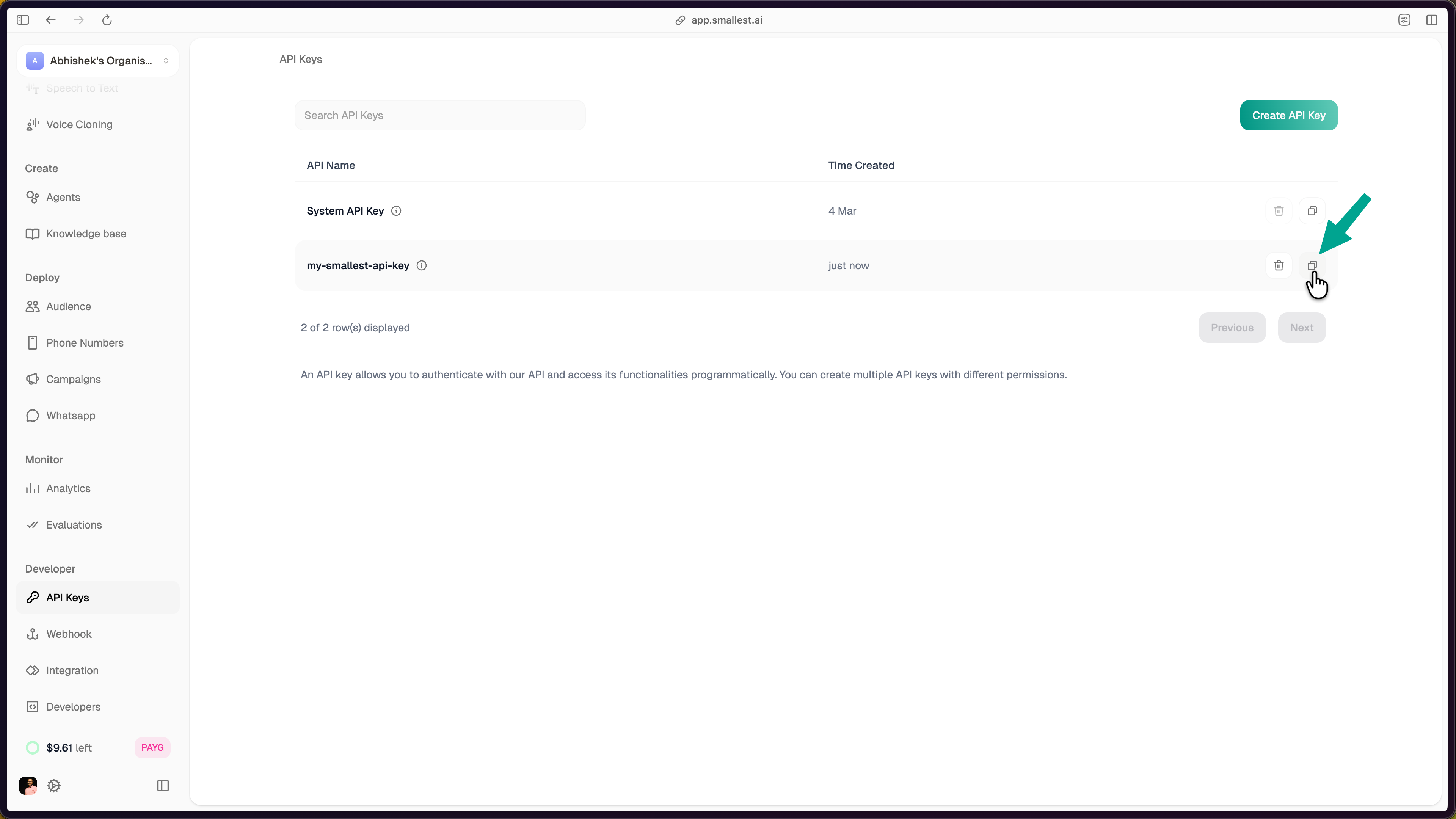
 The new key appears in your dashboard. Click the copy icon to copy it.
 Export the key in your terminal:
```bash
export SMALLEST_API_KEY="your-api-key-here"
```
New to Smallest AI?
[Sign up here](https://app.smallest.ai?utm_source=documentation&utm_medium=text-to-speech)
first.
## Step 2: Hear Audio in 30 Seconds
Paste this in your terminal — no install required:
```bash
curl -X POST "https://api.smallest.ai/waves/v1/lightning-v3.1/get_speech" \
-H "Authorization: Bearer $SMALLEST_API_KEY" \
-H "Content-Type: application/json" \
-d '{"text": "Hello from Smallest AI. This is Lightning v3.1.", "voice_id": "magnus", "sample_rate": 24000, "output_format": "wav"}' \
--output hello.wav
```
Play `hello.wav` — it should sound like this:
That's broadcast-quality TTS with \~100ms latency.
## Step 3: Build It Into Your App
```bash cURL
curl -X POST "https://api.smallest.ai/waves/v1/lightning-v3.1/get_speech" \
-H "Authorization: Bearer $SMALLEST_API_KEY" \
-H "Content-Type: application/json" \
-d '{
"text": "Modern problems require modern solutions.",
"voice_id": "magnus",
"sample_rate": 24000,
"speed": 1.0,
"language": "en",
"output_format": "wav"
}' --output output.wav
```
```python Python
import os
import requests
API_KEY = os.environ["SMALLEST_API_KEY"]
response = requests.post(
"https://api.smallest.ai/waves/v1/lightning-v3.1/get_speech",
headers={
"Authorization": f"Bearer {API_KEY}",
"Content-Type": "application/json",
},
json={
"text": "Modern problems require modern solutions.",
"voice_id": "magnus",
"sample_rate": 24000,
"speed": 1.0,
"language": "en",
"output_format": "wav",
},
)
with open("output.wav", "wb") as f:
f.write(response.content)
print(f"Saved output.wav ({len(response.content):,} bytes)")
```
```javascript JavaScript
const fs = require("fs");
const API_KEY = process.env.SMALLEST_API_KEY;
const response = await fetch(
"https://api.smallest.ai/waves/v1/lightning-v3.1/get_speech",
{
method: "POST",
headers: {
Authorization: `Bearer ${API_KEY}`,
"Content-Type": "application/json",
},
body: JSON.stringify({
text: "Modern problems require modern solutions.",
voice_id: "magnus",
sample_rate: 24000,
speed: 1.0,
language: "en",
output_format: "wav",
}),
}
);
const buffer = Buffer.from(await response.arrayBuffer());
fs.writeFileSync("output.wav", buffer);
console.log(`Saved output.wav (${buffer.length} bytes)`);
```
```python Python SDK
from smallestai.waves import WavesClient
client = WavesClient(api_key="YOUR_API_KEY")
audio = client.synthesize(
"Modern problems require modern solutions.",
sample_rate=24000,
speed=1.0,
)
with open("output.wav", "wb") as f:
f.write(audio)
```
**Full runnable source files:** [Python](https://github.com/smallest-inc/cookbook/blob/main/text-to-speech/quickstart-python.py) | [JavaScript](https://github.com/smallest-inc/cookbook/blob/main/text-to-speech/quickstart-javascript.js) | [cURL](https://github.com/smallest-inc/cookbook/blob/main/text-to-speech/quickstart-curl.sh)
## Step 4: Explore More
Browse 80+ voices across English, Hindi, Spanish, and Tamil.
Real-time audio streaming via WebSocket for voice assistants.
Clone any voice from just 5-15 seconds of audio.
Custom pronunciations for brand names and technical terms.
## Key Parameters
| Parameter | Type | Default | Description |
| --------------- | ------ | ---------- | ------------------------------------------------ |
| `text` | string | *required* | Text to synthesize (max \~250 chars recommended) |
| `voice_id` | string | *required* | Voice to use (e.g., `magnus`, `olivia`) |
| `sample_rate` | int | `44100` | `8000`, `16000`, `24000`, or `44100` Hz |
| `speed` | float | `1.0` | Speech rate: `0.5` to `2.0` |
| `language` | string | `auto` | `en`, `hi`, `es`, `ta`, or `auto` |
| `output_format` | string | `pcm` | `pcm`, `wav`, `mp3`, or `mulaw` |
## Need Help?
Ask questions, share what you're building, and connect with other developers on Discord.
If you need direct assistance, reach out at [support@smallest.ai](mailto:support@smallest.ai).
Export the key in your terminal:
```bash
export SMALLEST_API_KEY="your-api-key-here"
```
New to Smallest AI?
[Sign up here](https://app.smallest.ai?utm_source=documentation&utm_medium=text-to-speech)
first.
## Step 2: Hear Audio in 30 Seconds
Paste this in your terminal — no install required:
```bash
curl -X POST "https://api.smallest.ai/waves/v1/lightning-v3.1/get_speech" \
-H "Authorization: Bearer $SMALLEST_API_KEY" \
-H "Content-Type: application/json" \
-d '{"text": "Hello from Smallest AI. This is Lightning v3.1.", "voice_id": "magnus", "sample_rate": 24000, "output_format": "wav"}' \
--output hello.wav
```
Play `hello.wav` — it should sound like this:
That's broadcast-quality TTS with \~100ms latency.
## Step 3: Build It Into Your App
```bash cURL
curl -X POST "https://api.smallest.ai/waves/v1/lightning-v3.1/get_speech" \
-H "Authorization: Bearer $SMALLEST_API_KEY" \
-H "Content-Type: application/json" \
-d '{
"text": "Modern problems require modern solutions.",
"voice_id": "magnus",
"sample_rate": 24000,
"speed": 1.0,
"language": "en",
"output_format": "wav"
}' --output output.wav
```
```python Python
import os
import requests
API_KEY = os.environ["SMALLEST_API_KEY"]
response = requests.post(
"https://api.smallest.ai/waves/v1/lightning-v3.1/get_speech",
headers={
"Authorization": f"Bearer {API_KEY}",
"Content-Type": "application/json",
},
json={
"text": "Modern problems require modern solutions.",
"voice_id": "magnus",
"sample_rate": 24000,
"speed": 1.0,
"language": "en",
"output_format": "wav",
},
)
with open("output.wav", "wb") as f:
f.write(response.content)
print(f"Saved output.wav ({len(response.content):,} bytes)")
```
```javascript JavaScript
const fs = require("fs");
const API_KEY = process.env.SMALLEST_API_KEY;
const response = await fetch(
"https://api.smallest.ai/waves/v1/lightning-v3.1/get_speech",
{
method: "POST",
headers: {
Authorization: `Bearer ${API_KEY}`,
"Content-Type": "application/json",
},
body: JSON.stringify({
text: "Modern problems require modern solutions.",
voice_id: "magnus",
sample_rate: 24000,
speed: 1.0,
language: "en",
output_format: "wav",
}),
}
);
const buffer = Buffer.from(await response.arrayBuffer());
fs.writeFileSync("output.wav", buffer);
console.log(`Saved output.wav (${buffer.length} bytes)`);
```
```python Python SDK
from smallestai.waves import WavesClient
client = WavesClient(api_key="YOUR_API_KEY")
audio = client.synthesize(
"Modern problems require modern solutions.",
sample_rate=24000,
speed=1.0,
)
with open("output.wav", "wb") as f:
f.write(audio)
```
**Full runnable source files:** [Python](https://github.com/smallest-inc/cookbook/blob/main/text-to-speech/quickstart-python.py) | [JavaScript](https://github.com/smallest-inc/cookbook/blob/main/text-to-speech/quickstart-javascript.js) | [cURL](https://github.com/smallest-inc/cookbook/blob/main/text-to-speech/quickstart-curl.sh)
## Step 4: Explore More
Browse 80+ voices across English, Hindi, Spanish, and Tamil.
Real-time audio streaming via WebSocket for voice assistants.
Clone any voice from just 5-15 seconds of audio.
Custom pronunciations for brand names and technical terms.
## Key Parameters
| Parameter | Type | Default | Description |
| --------------- | ------ | ---------- | ------------------------------------------------ |
| `text` | string | *required* | Text to synthesize (max \~250 chars recommended) |
| `voice_id` | string | *required* | Voice to use (e.g., `magnus`, `olivia`) |
| `sample_rate` | int | `44100` | `8000`, `16000`, `24000`, or `44100` Hz |
| `speed` | float | `1.0` | Speech rate: `0.5` to `2.0` |
| `language` | string | `auto` | `en`, `hi`, `es`, `ta`, or `auto` |
| `output_format` | string | `pcm` | `pcm`, `wav`, `mp3`, or `mulaw` |
## Need Help?
Ask questions, share what you're building, and connect with other developers on Discord.
If you need direct assistance, reach out at [support@smallest.ai](mailto:support@smallest.ai).