***
title: Quickstart
description: Transcribe your first audio file in under 60 seconds with Pulse STT.
icon: rocket
------------
## Step 1: Get Your API Key
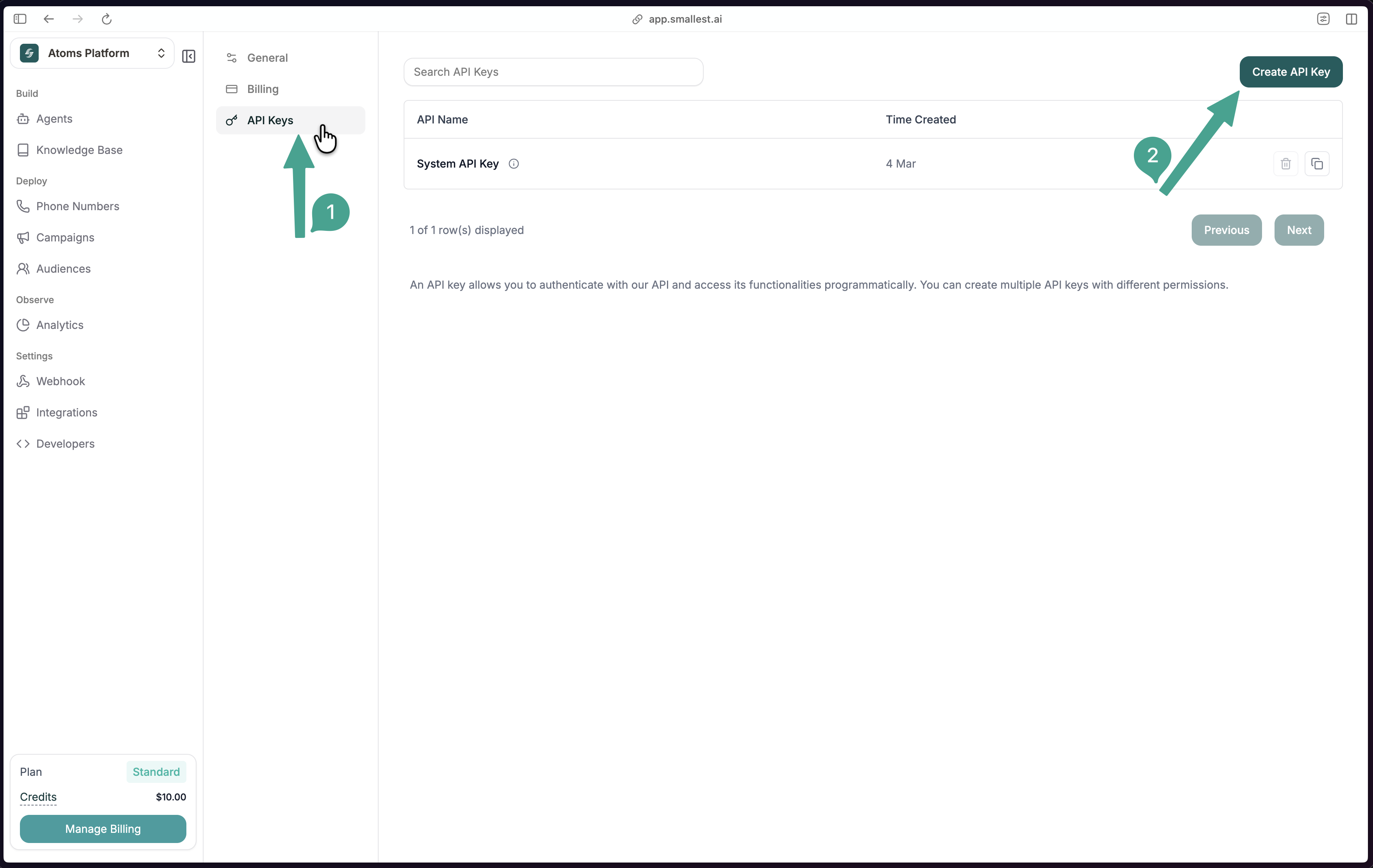
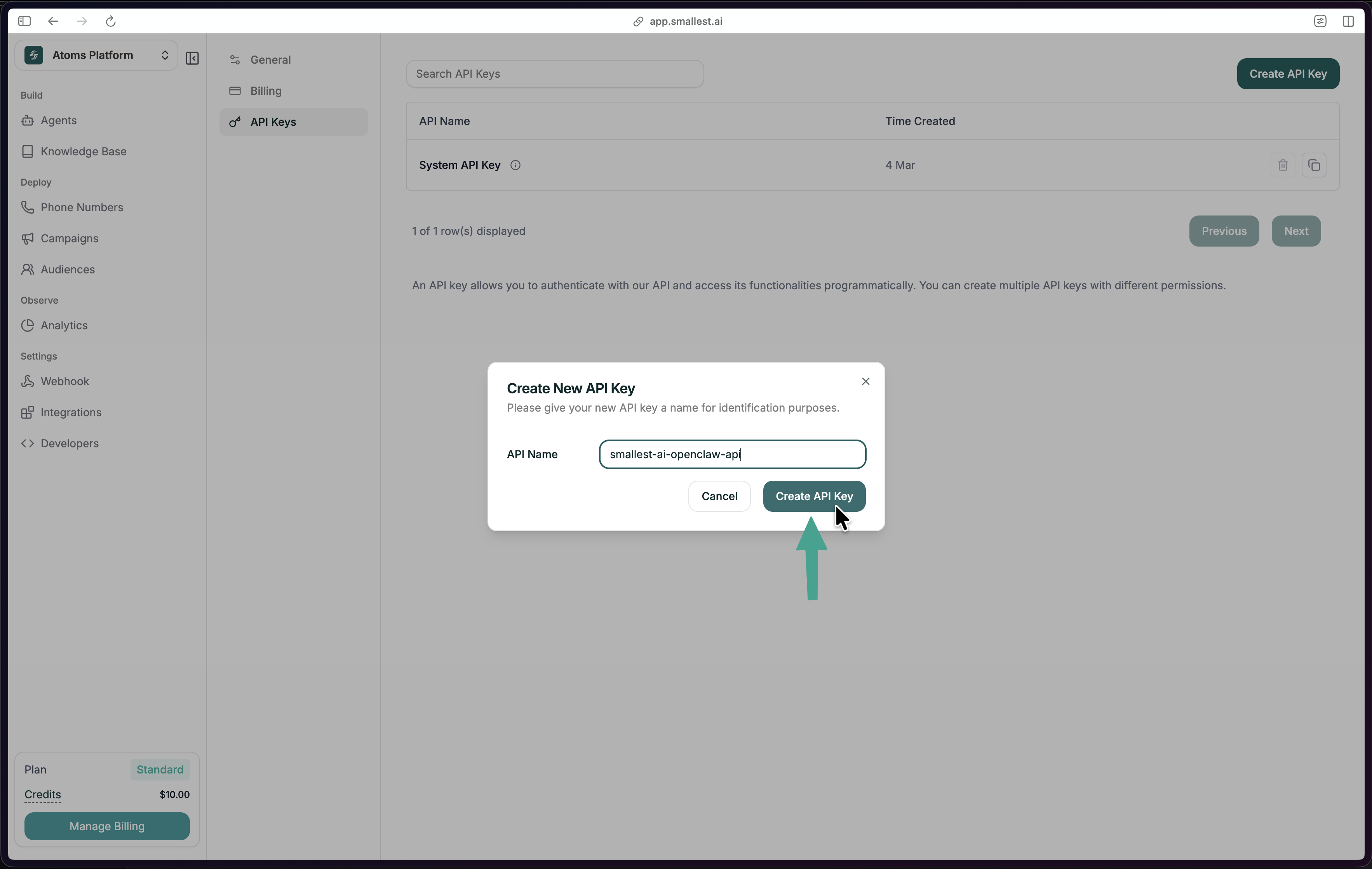
In the [Smallest AI Console](https://app.smallest.ai/dashboard/settings/apikeys?utm_source=documentation\&utm_medium=speech-to-text), go to **Settings -> API Keys** and click **Create API Key**.
Copy the key and export it:
```bash
export SMALLEST_API_KEY="your-api-key-here"
```
New to Smallest AI?
[Sign up here](https://app.smallest.ai?utm_source=documentation&utm_medium=speech-to-text)
first.
## Step 2: Transcribe Audio
Here's the sample audio we'll transcribe:
Paste this cURL — no install required:
```bash
curl -X POST "https://api.smallest.ai/waves/v1/pulse/get_text?language=en" \
-H "Authorization: Bearer $SMALLEST_API_KEY" \
-H "Content-Type: application/json" \
-d '{"url": "https://github.com/smallest-inc/cookbook/raw/main/speech-to-text/getting-started/samples/audio.wav"}'
```
You'll get back:
```json
{
"transcription": "This is a sample audio file for testing speech to text transcription with the Pulse API."
}
```
## Step 3: Build It Into Your App
```bash cURL
curl -X POST "https://api.smallest.ai/waves/v1/pulse/get_text?language=en" \
-H "Authorization: Bearer $SMALLEST_API_KEY" \
-H "Content-Type: application/json" \
-d '{"url":"https://github.com/smallest-inc/cookbook/raw/main/speech-to-text/getting-started/samples/audio.wav"}'
```
```python Python
import os
import requests
API_KEY = os.environ["SMALLEST_API_KEY"]
response = requests.post(
"https://api.smallest.ai/waves/v1/pulse/get_text",
params={"language": "en"},
headers={
"Authorization": f"Bearer {API_KEY}",
"Content-Type": "application/json",
},
json={
"url": "https://github.com/smallest-inc/cookbook/raw/main/speech-to-text/getting-started/samples/audio.wav"
},
timeout=120,
)
result = response.json()
print(result["transcription"])
```
```javascript JavaScript
const params = new URLSearchParams({ language: "en" });
const response = await fetch(
`https://api.smallest.ai/waves/v1/pulse/get_text?${params}`,
{
method: "POST",
headers: {
Authorization: `Bearer ${process.env.SMALLEST_API_KEY}`,
"Content-Type": "application/json",
},
body: JSON.stringify({
url: "https://github.com/smallest-inc/cookbook/raw/main/speech-to-text/getting-started/samples/audio.wav"
}),
}
);
const result = await response.json();
console.log(result.transcription);
```
**Full runnable source files:** [Python](https://github.com/smallest-inc/cookbook/blob/main/speech-to-text/transcribe-python.py) | [JavaScript](https://github.com/smallest-inc/cookbook/blob/main/speech-to-text/transcribe-javascript.js) | [cURL](https://github.com/smallest-inc/cookbook/blob/main/speech-to-text/transcribe-curl.sh)
## Step 4: Explore Features
Stream audio via WebSocket for live transcription.
Identify and label different speakers.
Precise timing for each transcribed word.
Analyze emotional tone in speech.
Full endpoint spec: [Pulse API Reference](/waves/api-reference)
## Need Help?
Ask questions and get help from the community.
Or email [support@smallest.ai](mailto:support@smallest.ai).
 Copy the key and export it:
```bash
export SMALLEST_API_KEY="your-api-key-here"
```
Copy the key and export it:
```bash
export SMALLEST_API_KEY="your-api-key-here"
```