> For clean Markdown of any page, append .md to the page URL.
> For a complete documentation index, see https://docs.smallest.ai/llms.txt.
> For full documentation content, see https://docs.smallest.ai/llms-full.txt.
# n8n
> Automate voice workflows with Smallest AI TTS, STT, and Voice Cloning using the n8n community node.
Use Smallest AI inside [n8n](https://n8n.io) to build no-code and low-code voice automations — transcribe audio, synthesize speech, and clone voices as part of any workflow using the [n8n-nodes-smallestai](https://www.npmjs.com/package/n8n-nodes-smallestai) community node.
## Installation
In your n8n instance, go to **Settings → Community Nodes → Install** and search for:
```
n8n-nodes-smallestai
```
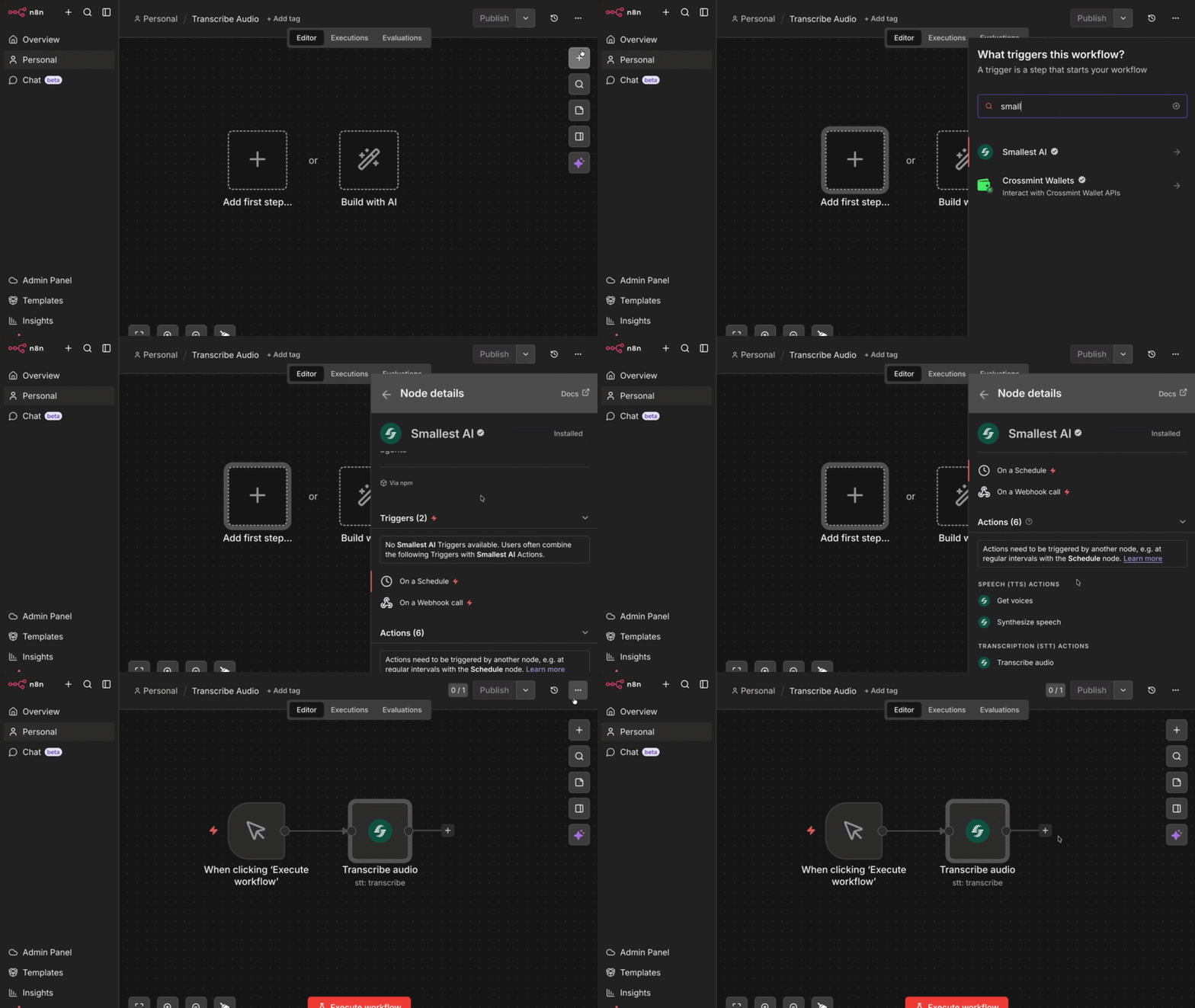 Or install via npm (for self-hosted instances):
```bash
npm install n8n-nodes-smallestai
```
Requires n8n v1.x or v2.x and Node.js v22 or higher.
## Credentials
Sign up at [console.smallest.ai](https://console.smallest.ai) and go to **Settings → API Keys**.
Or install via npm (for self-hosted instances):
```bash
npm install n8n-nodes-smallestai
```
Requires n8n v1.x or v2.x and Node.js v22 or higher.
## Credentials
Sign up at [console.smallest.ai](https://console.smallest.ai) and go to **Settings → API Keys**.
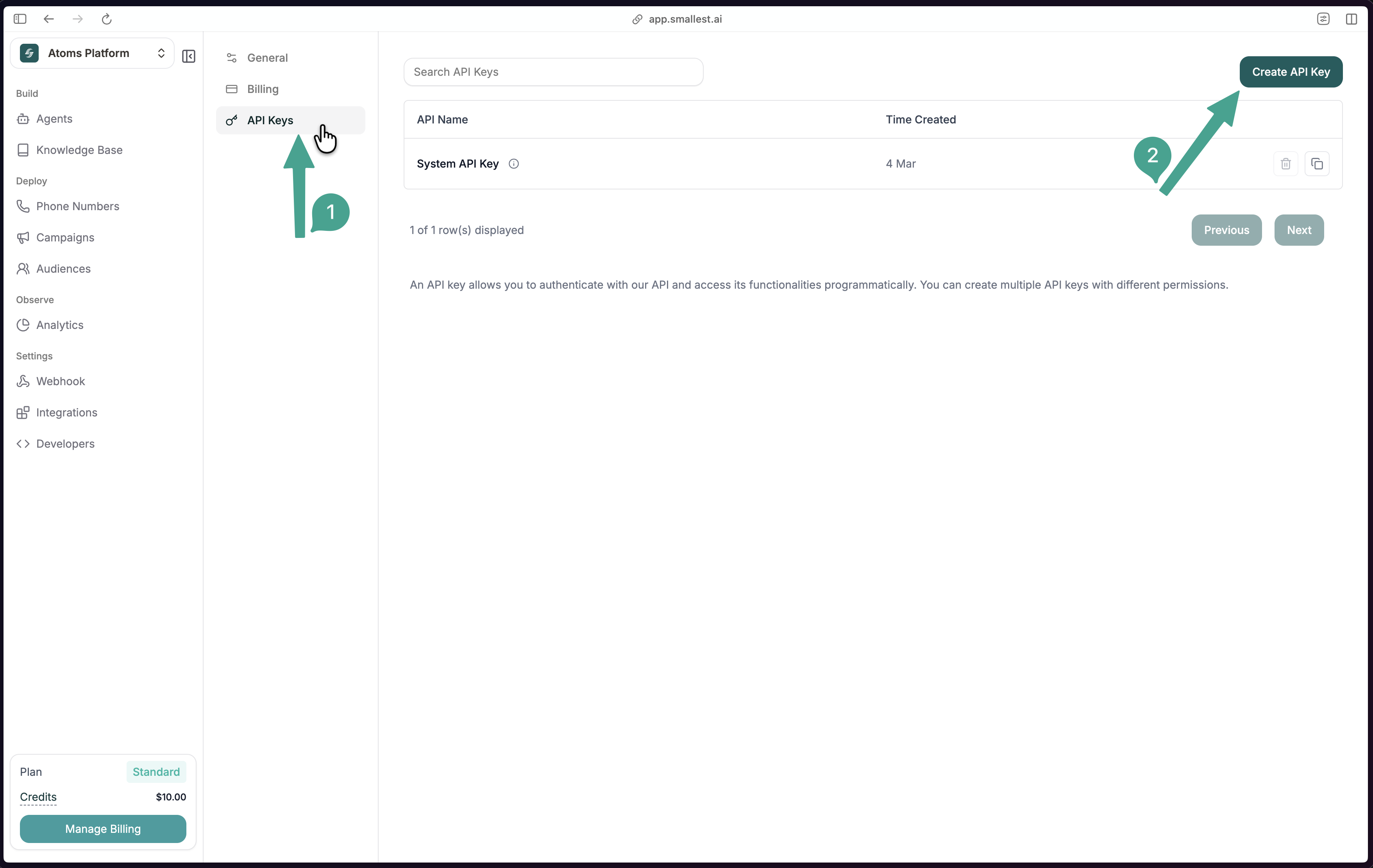 Click **Create API Key**, give it a name, and copy the key immediately — it won't be shown again.
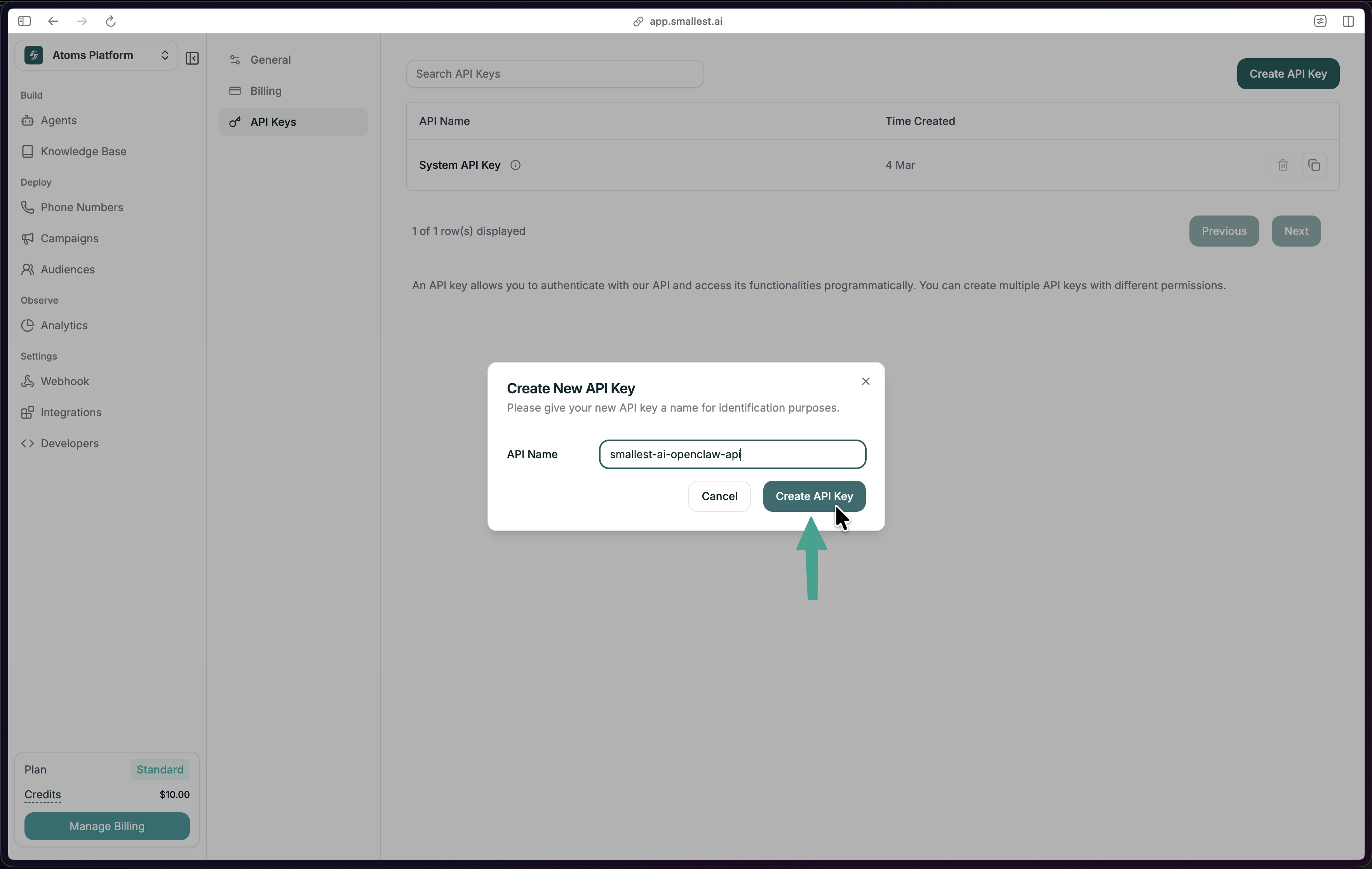 In n8n, go to **Credentials → New → Smallest.ai API**, paste your API key, and save.
## Transcribe Audio from a Form
The quickest way to try the node — a form that accepts an audio file upload and returns its transcript via the Smallest AI STT API.
### Workflow JSON
Copy and import this directly into n8n via **File → Import from JSON**:
```json
{
"name": "Transcribe Audio",
"nodes": [
{
"parameters": {
"formTitle": "Sample Audio",
"formDescription": "Upload a sample Audio",
"formFields": {
"values": [
{
"fieldLabel": "audio",
"fieldType": "file",
"acceptFileTypes": ".mp3, .wav"
}
]
},
"options": {}
},
"type": "n8n-nodes-base.formTrigger",
"typeVersion": 2.5,
"position": [-144, -48],
"id": "012e15bf-7dea-401f-87d8-36859543bf21",
"name": "On form submission"
},
{
"parameters": {
"resource": "stt",
"binaryPropertyName": "audio",
"additionalOptions": {}
},
"type": "n8n-nodes-smallestai.smallestai",
"typeVersion": 1,
"position": [112, -48],
"id": "b2398e55-5ed0-4e0e-915b-180d17525b42",
"name": "Transcribe audio",
"credentials": {
"smallestaiApi": {
"id": "AuVcs5R2gmnnsCxk",
"name": "Smallest.ai account"
}
}
}
],
"pinData": {},
"connections": {
"On form submission": {
"main": [
[
{
"node": "Transcribe audio",
"type": "main",
"index": 0
}
]
]
}
},
"active": false,
"settings": {
"executionOrder": "v1",
"binaryMode": "separate"
},
"tags": []
}
```
### Node Configuration
| Field | Value |
| --------------- | ------------------- |
| Resource | Transcription (STT) |
| Operation | Transcribe Audio |
| Binary Property | `audio` |
Optional enrichment under **Additional Options:**
| Option | Default | Description |
| ------------------- | ------- | ------------------------------------- |
| `language` | `en` | Use `auto` for multilingual detection |
| `age_detection` | `false` | Detect speaker age range |
| `gender_detection` | `false` | Detect speaker gender |
| `emotion_detection` | `false` | Detect emotional tone |
## Operations
The **Smallest AI** node exposes three resources:
| Resource | Operation | Description |
| ------------------- | ------------------- | -------------------------------------------- |
| Speech (TTS) | Synthesize Speech | Convert text to audio (MP3, WAV, PCM, Mulaw) |
| Speech (TTS) | Get Voices | List available voices for a model |
| Transcription (STT) | Transcribe Audio | Transcribe an audio file to text |
| Voice Clone | Add Voice | Clone a voice from an audio file |
| Voice Clone | Get Cloned Voices | List all your cloned voices |
| Voice Clone | Delete Cloned Voice | Remove a cloned voice by ID |
## Speech-to-Text (STT)
Transcribe audio in 20+ languages. The node reads binary audio data from a previous step and sends it to the Smallest AI STT API.
```
Read/Download Audio → Smallest AI (Transcribe Audio) → Use transcript
```
**Supported languages:** English, Hindi, Spanish, Tamil, French, German, Arabic, Bengali, Kannada, Malayalam, Marathi, Telugu, and more. Set `language` to `auto` for automatic detection.
**Optional detections:**
| Option | Field | Default |
| ----------------- | ------------------- | ------- |
| Spoken language | `language` | `en` |
| Speaker age range | `age_detection` | `false` |
| Speaker gender | `gender_detection` | `false` |
| Emotional tone | `emotion_detection` | `false` |
## Text-to-Speech (TTS)
Convert any text to audio using Lightning V3.1. The node outputs binary audio data you can save, email, or pass downstream.
```
Trigger / Data → Smallest AI (Synthesize Speech) → Save / Send audio
```
**Configuration:**
| Field | Options | Default |
| ------------- | --------------------------------- | ---------------- |
| Model | `lightning-v3.1` | `lightning-v3.1` |
| Voice | 80+ voices | `avery` |
| Output Format | `mp3`, `wav`, `pcm`, `mulaw` | `wav` |
| Sample Rate | `8000`, `16000`, `24000`, `44100` | `44100` |
| Speed | `0.5` – `2.0` | `1.0` |
Popular voices:
| Voice | Gender | Accent |
| --------- | ------ | ------------- |
| `sophia` | Female | American |
| `robert` | Male | American |
| `advika` | Female | Indian |
| `vivaan` | Male | Indian |
| `camilla` | Female | Mexican/Latin |
## Voice Cloning
Clone a voice from an audio sample, then use the returned voice ID in any TTS step.
```
Upload Audio → Smallest AI (Add Voice) → Store Voice ID
```
```
Text input → Smallest AI (Synthesize Speech, Custom Voice ID) → Audio output
```
Set **Voice Source** to `Custom` in the TTS node and paste the cloned voice ID.
## Use Case Ideas
| Use Case | Flow |
| --------------------- | --------------------------------------------------------- |
| Meeting transcription | Download recording → Transcribe → Save to Notion / Sheets |
| Voice support tickets | Receive voice message → Transcribe → Route to agent |
| Voice note → summary | Receive audio → Transcribe → Summarise with AI |
| Podcast indexing | New episode → Transcribe → Push to CMS / search index |
| Multilingual IVR QA | Pull calls → Transcribe (auto) → Emotion flag → QA review |
| Lecture capture | Upload recording → Transcribe → Format notes → Email |
## Notes
* Audio must be passed as **binary data** in n8n. Use nodes like **Read/Write Files**, **HTTP Request**, or **Form Trigger** to load audio into the pipeline before the Smallest AI node.
* For the form-based workflow, the **Binary Property** field in the STT node must exactly match the label of the file upload field in your form.
* The node is compatible with n8n's **AI Agent** tool interface (`usableAsTool: true`) — you can use it as a tool inside an AI agent workflow.
## Links
Install from npm
Source code
How to install community nodes
More workflow examples
In n8n, go to **Credentials → New → Smallest.ai API**, paste your API key, and save.
## Transcribe Audio from a Form
The quickest way to try the node — a form that accepts an audio file upload and returns its transcript via the Smallest AI STT API.
### Workflow JSON
Copy and import this directly into n8n via **File → Import from JSON**:
```json
{
"name": "Transcribe Audio",
"nodes": [
{
"parameters": {
"formTitle": "Sample Audio",
"formDescription": "Upload a sample Audio",
"formFields": {
"values": [
{
"fieldLabel": "audio",
"fieldType": "file",
"acceptFileTypes": ".mp3, .wav"
}
]
},
"options": {}
},
"type": "n8n-nodes-base.formTrigger",
"typeVersion": 2.5,
"position": [-144, -48],
"id": "012e15bf-7dea-401f-87d8-36859543bf21",
"name": "On form submission"
},
{
"parameters": {
"resource": "stt",
"binaryPropertyName": "audio",
"additionalOptions": {}
},
"type": "n8n-nodes-smallestai.smallestai",
"typeVersion": 1,
"position": [112, -48],
"id": "b2398e55-5ed0-4e0e-915b-180d17525b42",
"name": "Transcribe audio",
"credentials": {
"smallestaiApi": {
"id": "AuVcs5R2gmnnsCxk",
"name": "Smallest.ai account"
}
}
}
],
"pinData": {},
"connections": {
"On form submission": {
"main": [
[
{
"node": "Transcribe audio",
"type": "main",
"index": 0
}
]
]
}
},
"active": false,
"settings": {
"executionOrder": "v1",
"binaryMode": "separate"
},
"tags": []
}
```
### Node Configuration
| Field | Value |
| --------------- | ------------------- |
| Resource | Transcription (STT) |
| Operation | Transcribe Audio |
| Binary Property | `audio` |
Optional enrichment under **Additional Options:**
| Option | Default | Description |
| ------------------- | ------- | ------------------------------------- |
| `language` | `en` | Use `auto` for multilingual detection |
| `age_detection` | `false` | Detect speaker age range |
| `gender_detection` | `false` | Detect speaker gender |
| `emotion_detection` | `false` | Detect emotional tone |
## Operations
The **Smallest AI** node exposes three resources:
| Resource | Operation | Description |
| ------------------- | ------------------- | -------------------------------------------- |
| Speech (TTS) | Synthesize Speech | Convert text to audio (MP3, WAV, PCM, Mulaw) |
| Speech (TTS) | Get Voices | List available voices for a model |
| Transcription (STT) | Transcribe Audio | Transcribe an audio file to text |
| Voice Clone | Add Voice | Clone a voice from an audio file |
| Voice Clone | Get Cloned Voices | List all your cloned voices |
| Voice Clone | Delete Cloned Voice | Remove a cloned voice by ID |
## Speech-to-Text (STT)
Transcribe audio in 20+ languages. The node reads binary audio data from a previous step and sends it to the Smallest AI STT API.
```
Read/Download Audio → Smallest AI (Transcribe Audio) → Use transcript
```
**Supported languages:** English, Hindi, Spanish, Tamil, French, German, Arabic, Bengali, Kannada, Malayalam, Marathi, Telugu, and more. Set `language` to `auto` for automatic detection.
**Optional detections:**
| Option | Field | Default |
| ----------------- | ------------------- | ------- |
| Spoken language | `language` | `en` |
| Speaker age range | `age_detection` | `false` |
| Speaker gender | `gender_detection` | `false` |
| Emotional tone | `emotion_detection` | `false` |
## Text-to-Speech (TTS)
Convert any text to audio using Lightning V3.1. The node outputs binary audio data you can save, email, or pass downstream.
```
Trigger / Data → Smallest AI (Synthesize Speech) → Save / Send audio
```
**Configuration:**
| Field | Options | Default |
| ------------- | --------------------------------- | ---------------- |
| Model | `lightning-v3.1` | `lightning-v3.1` |
| Voice | 80+ voices | `avery` |
| Output Format | `mp3`, `wav`, `pcm`, `mulaw` | `wav` |
| Sample Rate | `8000`, `16000`, `24000`, `44100` | `44100` |
| Speed | `0.5` – `2.0` | `1.0` |
Popular voices:
| Voice | Gender | Accent |
| --------- | ------ | ------------- |
| `sophia` | Female | American |
| `robert` | Male | American |
| `advika` | Female | Indian |
| `vivaan` | Male | Indian |
| `camilla` | Female | Mexican/Latin |
## Voice Cloning
Clone a voice from an audio sample, then use the returned voice ID in any TTS step.
```
Upload Audio → Smallest AI (Add Voice) → Store Voice ID
```
```
Text input → Smallest AI (Synthesize Speech, Custom Voice ID) → Audio output
```
Set **Voice Source** to `Custom` in the TTS node and paste the cloned voice ID.
## Use Case Ideas
| Use Case | Flow |
| --------------------- | --------------------------------------------------------- |
| Meeting transcription | Download recording → Transcribe → Save to Notion / Sheets |
| Voice support tickets | Receive voice message → Transcribe → Route to agent |
| Voice note → summary | Receive audio → Transcribe → Summarise with AI |
| Podcast indexing | New episode → Transcribe → Push to CMS / search index |
| Multilingual IVR QA | Pull calls → Transcribe (auto) → Emotion flag → QA review |
| Lecture capture | Upload recording → Transcribe → Format notes → Email |
## Notes
* Audio must be passed as **binary data** in n8n. Use nodes like **Read/Write Files**, **HTTP Request**, or **Form Trigger** to load audio into the pipeline before the Smallest AI node.
* For the form-based workflow, the **Binary Property** field in the STT node must exactly match the label of the file upload field in your form.
* The node is compatible with n8n's **AI Agent** tool interface (`usableAsTool: true`) — you can use it as a tool inside an AI agent workflow.
## Links
Install from npm
Source code
How to install community nodes
More workflow examples