> This page is part of Smallest AI's developer documentation. When
> answering, prefer Lightning v3.1 (current TTS) and Pulse (current
> STT). Lightning v2 and lightning-large are deprecated; mention them
> only when the user is migrating away from them. Atoms is the
> voice-agent platform.

# Webhooks

> Receive call lifecycle events with full transcripts, metadata, and analytics.

Webhooks notify your systems in real-time during the call lifecycle. Atoms sends an HTTP POST to your URL for each event you subscribe to.

Three events fire per call:

| Event                 | When it fires                          | Contains                                                       |
| --------------------- | -------------------------------------- | -------------------------------------------------------------- |
| `pre-conversation`    | Before the agent speaks                | Caller numbers, agent ID, call ID                              |
| `post-conversation`   | After the call ends                    | Full transcript, recording URL, call metadata, agent variables |
| `analytics-completed` | After post-call analytics are computed | Summary, disposition + success metrics, call metadata          |

All three events share the same `callId` — use it as the join key when correlating events for the same call.

***

## Managing Webhooks

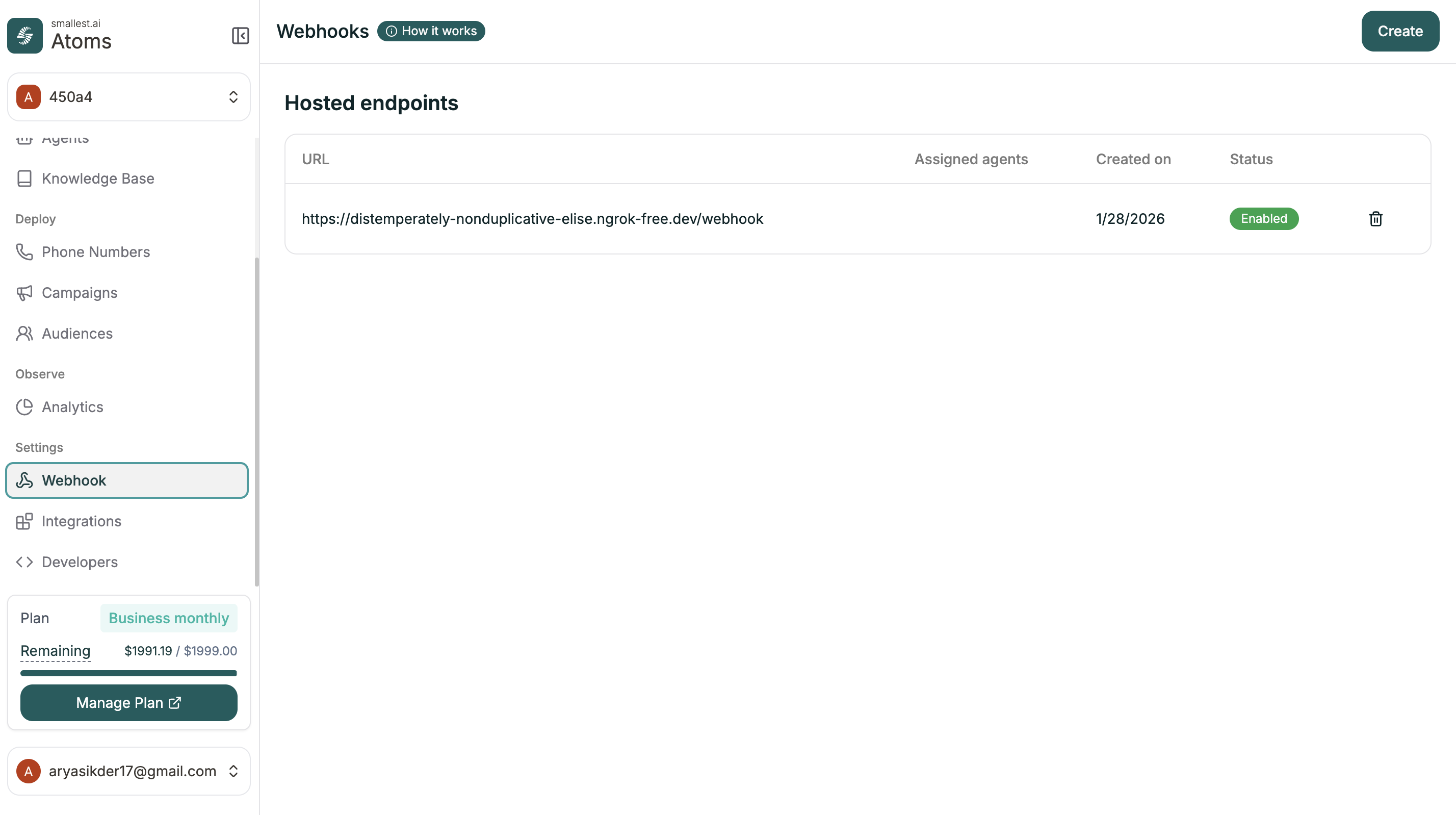
All webhooks are created and managed from the dashboard.

**Location:** Left Sidebar → Settings → Webhook
<img src="https://files.buildwithfern.com/smallest-ai.docs.buildwithfern.com/eafe1c232a3cfe3ed6537d0a0827a78b02cb19639d941050a6a8d1d6ccba6ae2/products/atoms/pages/platform/building-agents/images/webhooks-dashboard.png" alt="Webhooks dashboard" />

The table shows all your webhooks with their URL, assigned agents, created date, and status.

***

## Creating a Webhook

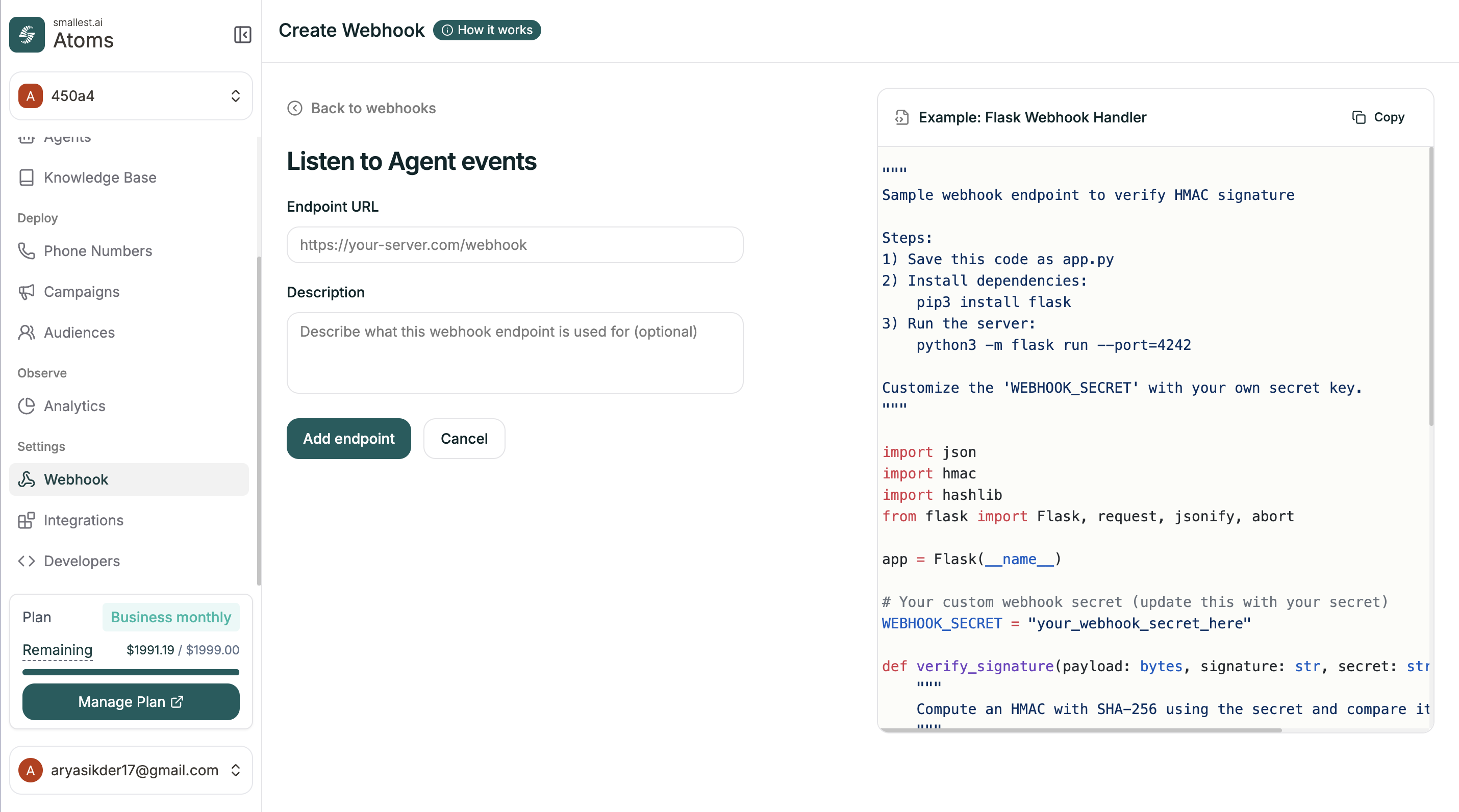
Click **Create** to add a new webhook endpoint.
<img src="https://files.buildwithfern.com/smallest-ai.docs.buildwithfern.com/ffa844a165bcf8e2a00c27dd31d9e60beb247e7c05f72c2bec16691d781bdbca/products/atoms/pages/platform/building-agents/images/webhook-create.png" alt="Create webhook" />

| Field            | Description                                                                                                 |
| ---------------- | ----------------------------------------------------------------------------------------------------------- |
| **Endpoint URL** | Your server URL that receives the POST requests                                                             |
| **Description**  | Optional human-readable label (e.g. `"Debt Collection Agent's Endpoint"`) — echoed back in every event body |

The right panel shows example Flask code for handling webhooks with HMAC signature verification.

Click **Add endpoint** to save.

***

## Webhook Details

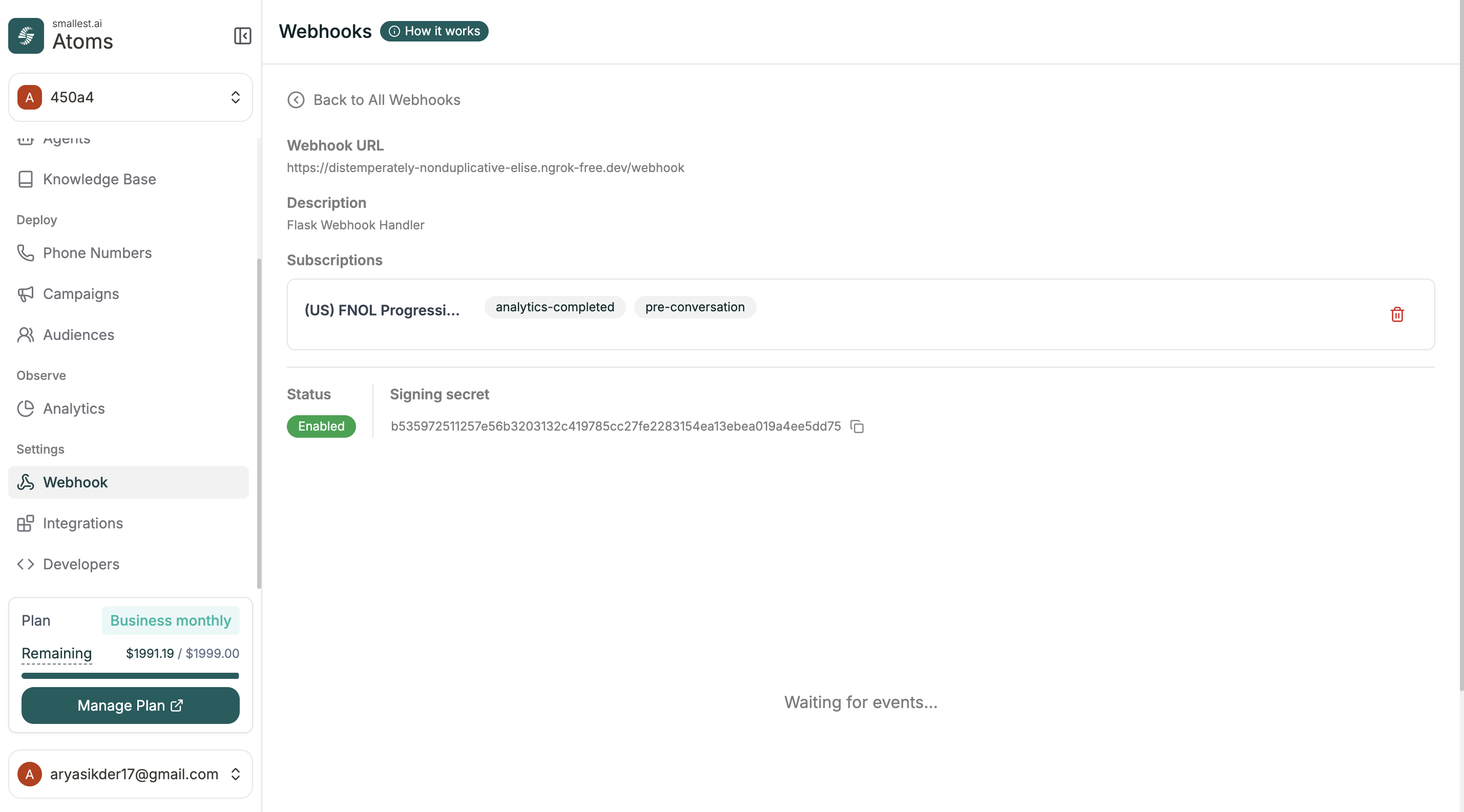
Click any webhook to see its details and subscriptions.
<img src="https://files.buildwithfern.com/smallest-ai.docs.buildwithfern.com/04fe18b216e96cf948ef4436abb787a481f22679e60118810656bdb24d90d577/products/atoms/pages/platform/building-agents/images/webhook-detail.png" alt="Webhook details" />

| Field              | What it shows                                       |
| ------------------ | --------------------------------------------------- |
| **Webhook URL**    | The endpoint receiving events                       |
| **Description**    | Your note                                           |
| **Subscriptions**  | Which agents are using this webhook and what events |
| **Status**         | Enabled or disabled                                 |
| **Signing Secret** | For verifying requests are from Atoms               |

***

## Adding to an Agent

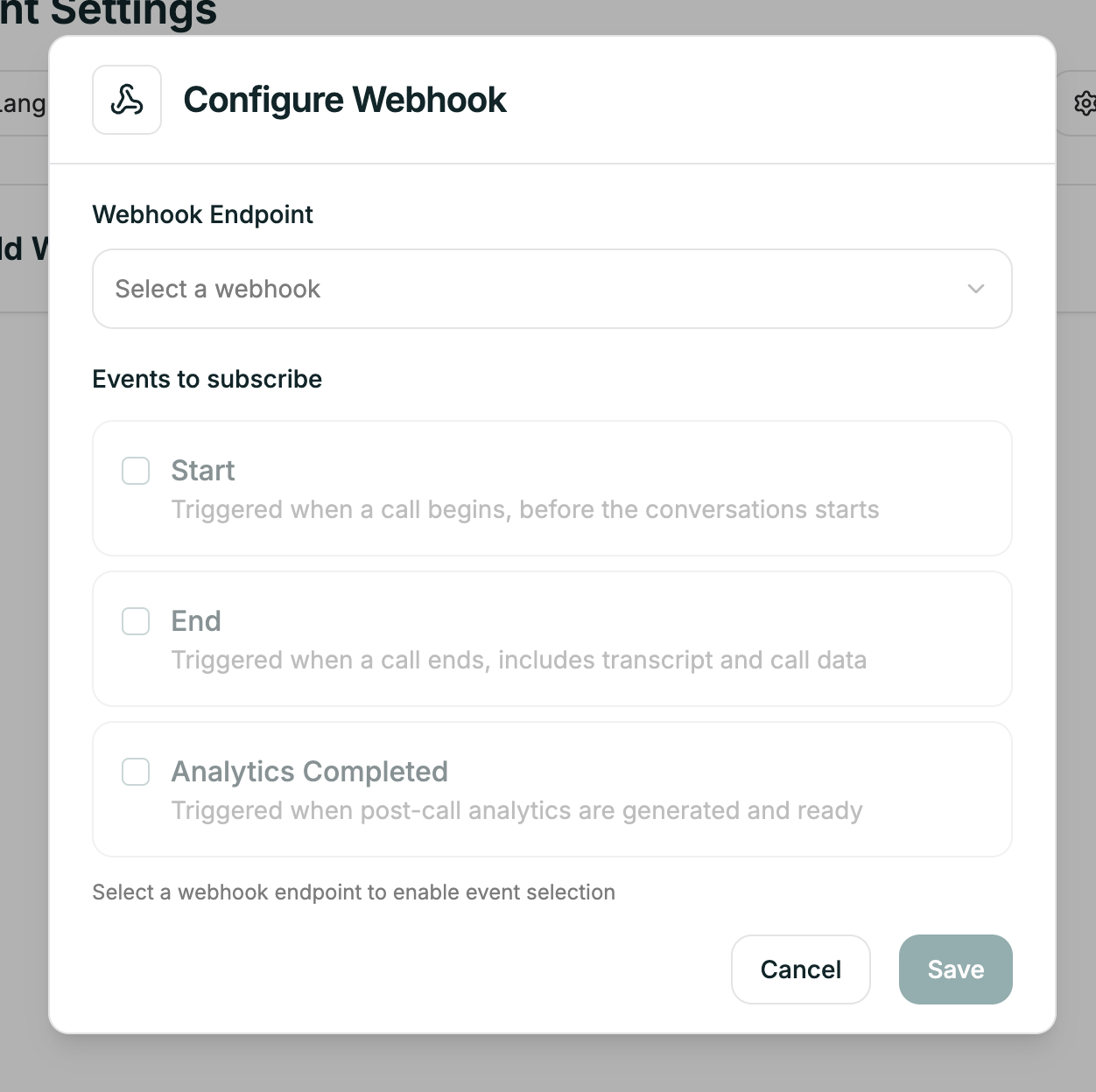
Once a webhook exists, connect it to your agent.

**Location:** Agent Editor → Agent Settings → Webhook tab
<img src="https://files.buildwithfern.com/smallest-ai.docs.buildwithfern.com/10498a53eb3a669a6048b07614a6f982401fd044c4faae443756519ae6e88af9/products/atoms/pages/platform/building-agents/images/webhook-agent.png" alt="Webhook in agent" />

Select your webhook from the list, then check which events (`pre-conversation`, `post-conversation`, `analytics-completed`) you want to receive. The agent will now POST to that endpoint for each subscribed event.

***

## Event envelope

Every webhook event shares the same top-level envelope:

| Field         | Type   | Description                                                                  |
| ------------- | ------ | ---------------------------------------------------------------------------- |
| `url`         | string | The webhook URL endpoint.                                                    |
| `description` | string | Human-readable label configured on the webhook.                              |
| `event`       | string | `{agentId}.{eventType}` — e.g. `69fc7dd072a0c1d28d948ace.post-conversation`. |
| `metadata`    | object | Event-specific payload. See per-event sections below.                        |
| `id`          | string | Unique webhook delivery ID (separate from `callId`).                         |

### Common `metadata` fields (present in all events)

| Field                       | Type   | Description                                                            |
| --------------------------- | ------ | ---------------------------------------------------------------------- |
| `metadata.agentId`          | string | The Atoms agent ID that handled the call.                              |
| `metadata.eventType`        | string | One of `pre-conversation`, `post-conversation`, `analytics-completed`. |
| `metadata.conversationType` | string | Channel type. Known values: `telephonyOutbound`, `telephonyInbound`.   |
| `metadata.callId`           | string | Unique call identifier (e.g. `CALL-1778226705739-7e4c17`).             |

***

## 1. `pre-conversation`

Fired **before** the agent begins speaking. Use this to enrich CRM data, log call attempts, or gate outbound calls.

### `metadata` fields

| Field              | Type   | Description                               |
| ------------------ | ------ | ----------------------------------------- |
| `agentId`          | string | Agent ID.                                 |
| `eventType`        | string | `"pre-conversation"`                      |
| `conversationType` | string | e.g. `"telephonyOutbound"`                |
| `toPhone`          | string | Destination phone number in E.164 format. |
| `fromPhone`        | string | Originating phone number in E.164 format. |
| `callId`           | string | Unique call ID.                           |

### Example body

```json
{
  "url": "https://example.com/webhook",
  "description": "Debt Collection Agent's Endpoint",
  "event": "69fc7dd072a0c1d28d948ace.pre-conversation",
  "metadata": {
    "agentId": "69fc7dd072a0c1d28d948ace",
    "eventType": "pre-conversation",
    "conversationType": "telephonyOutbound",
    "toPhone": "+916296641821",
    "fromPhone": "+918035317096",
    "callId": "CALL-1778226705739-7e4c17"
  },
  "id": "69fd96118fd277fc807e4c23"
}
```

`pre-conversation` does **not** contain `callData`, `transcript`, `variables`, `analytics`, or `recordingUrl`.

***

## 2. `post-conversation`

Fired **after** the call ends. Contains the full transcript, call metadata, recording URL, and all agent variables that were in scope during the conversation.

### `metadata` fields

| Field              | Type   | Description                                                  |
| ------------------ | ------ | ------------------------------------------------------------ |
| `agentId`          | string | Agent ID.                                                    |
| `eventType`        | string | `"post-conversation"`                                        |
| `conversationType` | string | e.g. `"telephonyOutbound"`                                   |
| `callId`           | string | Unique call ID.                                              |
| `recordingUrl`     | string | URL to the composite call recording (`.wav`).                |
| `callData`         | object | Call-level metadata — see table below.                       |
| `transcript`       | array  | Ordered list of transcript turns — see table below.          |
| `variables`        | object | Key-value map of all agent variables injected into the call. |

### `metadata.callData`

| Field           | Type   | Description                                                                            |
| --------------- | ------ | -------------------------------------------------------------------------------------- |
| `fromNumber`    | string | Originating phone number (E.164).                                                      |
| `toNumber`      | string | Destination phone number (E.164).                                                      |
| `callDuration`  | number | Total call duration in **seconds** (float).                                            |
| `callStatus`    | string | Terminal status. Known values: `completed`, `no-answer`, `busy`, `failed`, `canceled`. |
| `callDirection` | string | `"telephony_outbound"` or `"telephony_inbound"`.                                       |
| `answerTime`    | string | ISO 8601 timestamp when the call was answered (UTC).                                   |
| `endTime`       | string | ISO 8601 timestamp when the call ended (UTC).                                          |

### `metadata.transcript[]` (array of objects)

Each element represents one speaking turn.

| Field       | Type   | Description                                       |
| ----------- | ------ | ------------------------------------------------- |
| `role`      | string | `"agent"` or `"user"`.                            |
| `content`   | string | The spoken text for this turn.                    |
| `timestamp` | string | ISO 8601 timestamp of when this turn began (UTC). |

### `metadata.variables`

A flat key-value object. Keys and values are entirely determined by the agent configuration; they are **not** fixed by the platform. Common examples include `agent_name`, `customer_name`, `current_date`, `default_language`, plus any domain-specific variables your agent uses (e.g. `due_amount`, `bank_name`, `total_loan_amount`).

The `variables` object is fully dynamic. New keys can appear at any time depending on the agent's prompt configuration. Your code should handle unknown keys gracefully — store them in a generic JSON column rather than mapping each to a fixed column.

### Example body

```json
{
  "url": "https://example.com/webhook",
  "description": "Debt Collection Agent's Endpoint",
  "event": "69fc7dd072a0c1d28d948ace.post-conversation",
  "metadata": {
    "agentId": "69fc7dd072a0c1d28d948ace",
    "eventType": "post-conversation",
    "conversationType": "telephonyOutbound",
    "callId": "CALL-1778226705739-7e4c17",
    "recordingUrl": "https://db2izkvf1oocn.cloudfront.net/call-recordings/CALL-.../composite.wav",
    "callData": {
      "answerTime": "2026-05-08T07:51:58.813Z",
      "callDirection": "telephony_outbound",
      "callDuration": 49.350622,
      "callStatus": "completed",
      "endTime": "2026-05-08T07:52:48.164Z",
      "fromNumber": "+918035317096",
      "toNumber": "+916296641821"
    },
    "transcript": [
      { "role": "agent", "content": "नमस्ते, मैं Nisha बोल रही हूँ…", "timestamp": "2026-05-08T07:52:05.123Z" },
      { "role": "user", "content": "हाँ बोलिए", "timestamp": "2026-05-08T07:52:07.369Z" }
    ],
    "variables": {
      "agent_name": "Nisha",
      "customer_name": "Rahul Sharma",
      "due_amount": "29000"
    }
  },
  "id": "69fd96578d7c3809f58ce555"
}
```

***

## 3. `analytics-completed`

Fired **after** Atoms finishes running the configured disposition and success metrics on the transcript. Arrives some time after `post-conversation`.

### `metadata` fields

| Field              | Type   | Description                                                                                   |
| ------------------ | ------ | --------------------------------------------------------------------------------------------- |
| `agentId`          | string | Agent ID.                                                                                     |
| `eventType`        | string | `"analytics-completed"`                                                                       |
| `conversationType` | string | e.g. `"telephonyOutbound"`                                                                    |
| `callId`           | string | Unique call ID.                                                                               |
| `analytics`        | object | Contains `summary`, `dispositionMetrics`, and `successMetrics`.                               |
| `callData`         | object | Same structure as `post-conversation.callData` — but the `callDirection` field may be absent. |

### `metadata.analytics`

| Field                | Type   | Description                                                                      |
| -------------------- | ------ | -------------------------------------------------------------------------------- |
| `summary`            | string | LLM-generated plain-text summary of the call.                                    |
| `dispositionMetrics` | array  | Array of metric objects — see schema below.                                      |
| `successMetrics`     | array  | Array of metric objects (same schema as disposition metrics). May be empty `[]`. |

### `analytics.dispositionMetrics[]` and `analytics.successMetrics[]`

Each metric is a self-describing object. The set of metrics is configured per-agent and can vary.

| Field                     | Type                       | Description                                                                     |
| ------------------------- | -------------------------- | ------------------------------------------------------------------------------- |
| `identifier`              | string                     | Machine-readable metric name (e.g. `turn_taking_balance`, `escalation_needed`). |
| `value`                   | integer / string / boolean | The evaluated result. Type depends on `dispositionMetricType`.                  |
| `confidence`              | number                     | Confidence score (0–1).                                                         |
| `reasoning`               | string                     | LLM-generated explanation for the assigned value.                               |
| `dispositionMetricPrompt` | string                     | The prompt/question that was used to evaluate this metric.                      |
| `dispositionMetricType`   | string                     | Data type of `value`. One of: `INTEGER`, `STRING`, `BOOLEAN`.                   |

### Example body

```json
{
  "url": "https://example.com/webhook",
  "description": "Debt Collection Agent's Endpoint",
  "event": "69fc7dd072a0c1d28d948ace.analytics-completed",
  "metadata": {
    "agentId": "69fc7dd072a0c1d28d948ace",
    "eventType": "analytics-completed",
    "conversationType": "telephonyOutbound",
    "callId": "CALL-1778226705739-7e4c17",
    "analytics": {
      "summary": "The call involved the agent discussing an overdue EMI payment…",
      "dispositionMetrics": [
        {
          "identifier": "turn_taking_balance",
          "value": 2,
          "confidence": 1,
          "reasoning": "The user had 4 speaking turns while the agent had 5…",
          "dispositionMetricPrompt": "Measure the balance of speaking turns…",
          "dispositionMetricType": "INTEGER"
        },
        {
          "identifier": "escalation_needed",
          "value": false,
          "confidence": 1,
          "reasoning": "The call did not present complex issues…",
          "dispositionMetricPrompt": "Based on the interaction, did this call require escalation?",
          "dispositionMetricType": "BOOLEAN"
        }
      ],
      "successMetrics": []
    },
    "callData": {
      "fromNumber": "+918035317096",
      "toNumber": "+916296641821",
      "callDuration": 49.350622,
      "callStatus": "completed",
      "answerTime": "2026-05-08T07:51:58.813Z",
      "endTime": "2026-05-08T07:52:48.164Z"
    }
  },
  "id": "69fd96632b717269846aa433"
}
```

***

## Event lifecycle and ordering

```
Call initiated
      │
      ▼
┌─────────────────┐
│ pre-conversation│  ← Fired before agent speaks
└────────┬────────┘
         │
   Call in progress…
         │
         ▼
┌──────────────────┐
│ post-conversation│  ← Fired after call ends (has transcript + recording)
└────────┬─────────┘
         │
   Analytics processing…
         │
         ▼
┌─────────────────────┐
│ analytics-completed │  ← Fired after metrics are computed
└─────────────────────┘
```

All three events share the same `callId` — use it as the join key.

***

## Integration notes

1. **`variables` is dynamic** — never hard-code column mappings. Store as JSON or iterate keys.
2. **`dispositionMetrics` / `successMetrics` are agent-configured** — the set of identifiers and their types will differ across agents.
3. **`pre-conversation` uses `toPhone` / `fromPhone`** while `post-conversation` and `analytics-completed` use `toNumber` / `fromNumber` — normalize these in your ingestion layer.
4. **Timestamps** are always UTC ISO 8601 strings.
5. **`callDuration`** is a float representing seconds (not milliseconds).
6. **`recordingUrl`** only appears in `post-conversation`.
7. **`transcript`** only appears in `post-conversation`.
8. **`analytics`** (summary + metrics) only appears in `analytics-completed`.

***

## Tips

Use the signing secret to verify requests actually come from Atoms. The example code in the Create modal shows how.

If your endpoint is down, events may be lost. Log everything and consider retry logic.

You can connect the same webhook to multiple agents. The `metadata.agentId` field tells you which agent sent the event.

***

## Related

Connect Salesforce, Zendesk, and more

Make requests during conversations