***
title: Workflow Builder
sidebarTitle: Workflow Builder
description: The visual canvas for designing conversation flows.
----------------------------------------------------------------
The workflow builder is where you design your conversation. Drag nodes onto the canvas, connect them with branches, and see your entire flow at a glance.
***
## The Interface
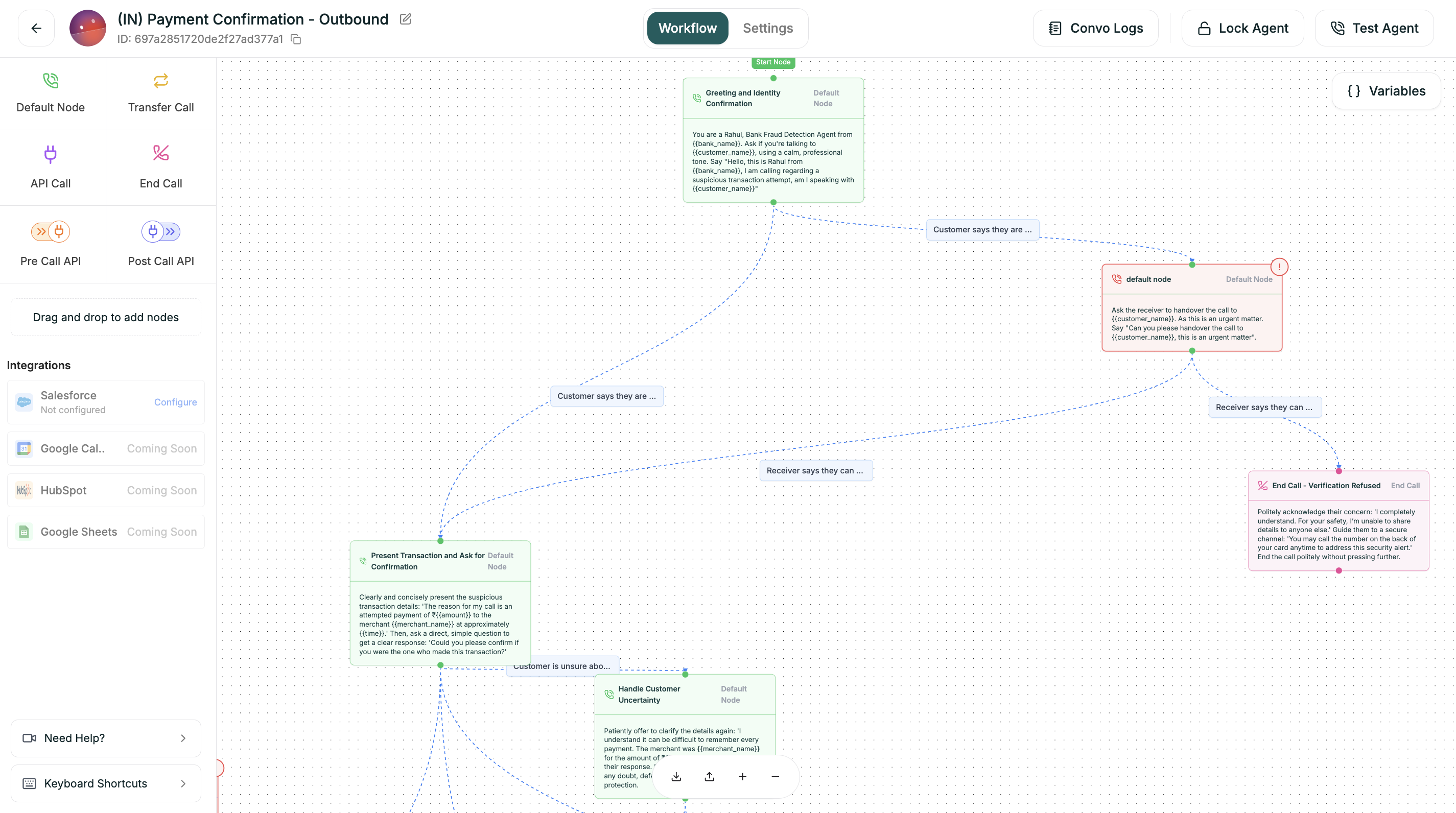
| Area | Location | Purpose |
| ---------------- | ---------------- | -------------------------------------------- |
| **Node Palette** | Left panel | All available node types to drag onto canvas |
| **Canvas** | Center | Your visual workspace |
| **Node Config** | Right panel | Settings for the selected node |
| **Variables** | Top right button | Manage flow-wide variables |
| **Controls** | Bottom | Auto-layout, zoom, feedback |
***
## Adding Nodes
1. Find the node type in the left palette
2. Drag it onto the canvas
3. Release where you want it placed
Every flow starts with a **Start** node (the green pill). Connect your first node to Start to begin the conversation.
***
## Connecting Nodes
1. Hover over a node to see connection handles (small circles)
2. Drag from an output handle
3. Drop onto another node's input handle
Connections show conversation flow. When a node finishes, the conversation moves to the connected node.
***
## Configuring Nodes
Click any node to open its settings in the right panel. Each node type has different options:
| Node | Key Settings |
| ----------------- | --------------------------------------------------- |
| **Default** | Name, Prompt, Branches, Uninterruptible toggle |
| **API Call** | Method, URL, Headers, Body, Response extraction |
| **Transfer Call** | Phone number, Transfer type, Warm transfer messages |
| **End Call** | Closing message |
***
## Variables Panel
Click **{ } Variables** (top right) to manage variables:
| Tab | Contents |
| ---------------- | ------------------------------------------------------- |
| **User Defined** | Variables you create |
| **System** | Platform-provided (caller\_phone, call\_duration, etc.) |
| **API** | Values extracted from API responses |
Use variables in any prompt with `{{variable_name}}` syntax.
***
## Canvas Controls
| Control | Function |
| --------------- | ---------------------------- |
| **Auto-layout** | Automatically organize nodes |
| **Zoom +/-** | Adjust view |
| **Pan** | Click and drag empty space |
Use **Auto-layout** often. It keeps your flow readable as it grows.
***
## Keyboard Shortcuts
| Shortcut | Action |
| ---------------------- | --------------- |
| `Delete` | Delete selected |
| `Cmd/Ctrl + Z` | Undo |
| `Cmd/Ctrl + Shift + Z` | Redo |
| `Escape` | Deselect |
***
## Next
Every node and how to configure it
Create paths based on responses